

-
Written By Evren Cole
-
Updated on May 30th, 2026
Best Way to Convert EML file to PDF for Windows & Mac
Summary: : The most frequently asked question is “How to convert EML files to PDF with attachments.” Hence, in this blog, we will provide you with the best solutions to convert EML file to PDF. There are manual techniques as well as expert EML Converter Software, which can quickly convert many EML files to PDF files with attachments.
|
You can convert EML files to PDF using Outlook, Thunderbird, or a professional EML Converter tool. For bulk conversion with attachments, automated software is recommended. |
Most email clients and servers use the Electronic Mail Format (EML) extension. An email message’s EML file includes the email’s content, subject, sender, and recipient information, and any attachments, which email clients like Apple Mail or Outlook can use.
While Adobe’s 1992 creation, Portable Document Format, is a commonly used file format. Since then, it has emerged as the preferred file for exchanging documents for personal and professional purposes. A PDF file comprises various components, including text, fonts, URLs, tables, graphics, and photos. Because they can be easily seen on several platforms. However, other reasons also lead users to change EML to PDF file formats, as described in the next segment.
Why Need to Convert EML file to PDF?
There are many reasons to convert an EML file to PDF, but the following are some common ones:-
- EML files can only be helpful in some specific email apps, while PDF files are accepted on practically every platform.
- You can password-protect a PDF file and keep your information safe and secure.
- PDF files open easily offline on any device, while EML files require compatible email applications like Outlook or Thunderbird.
The aforementioned data highlights that you should convert EML files to PDF to make shared content accessible while preserving privacy and security. Therefore, in the section below, you will find the best methods to save an EML file as a PDF.
Most Preferred Approaches to Convert EML file to PDF
Follow the given methods to complete the conversion of EML files into PDF.
- Using Thunderbird
- Microsoft Outlook
- Professional Software
Method 1: Convert EML to PDF for Free Using Thunderbird
One of the most widely used email applications, Thunderbird, supports EML files and lets you save EML files as PDF files.
- Launch the Thunderbird app on your computer.
- You need to add your EML files to Mozilla Thunderbird.
- Next, right-click on the folders that contain EML email messages to choose them.
- Select Export all Messages in the Folder under ImportExportTools NG.
- Select the PDF option to save your files.
- To choose the preferred location to save your data >> click the Browse option.
- To download the EML messages as PDF files, click Ok at the end.
By following the above steps, you can save the EML file as a PDF.
Method 2: EML to PDF Conversion Using MS Outlook
Another email software that supports EML files is Microsoft Outlook; all you have to do to view, open, and read an EML file is drag it into Outlook. Additionally, Outlook provides the ability to print important emails or save them in PDF format for printing.
- Open MS Outlook on your computer.
- Drag and drop the selected EML files into Outlook.
- Click on the File button once you’ve located your email message in Outlook.
- From the left panel, select the Print option.
- Go to the Print tab by clicking Print Options.
- The Name drop-down menu should have an option for Microsoft Print to PDF.
- To save EML email messages as PDFs, you have to select Print.
- Give the file a name and a saving destination, then press Save.
When Manual Method fail?
- When you convert EML files manually takes a lot of time.
- Attachments and important emails may get lost or messed up during the process.
- You need to install extra software like Thunderbird or Outlook just to get started.
- If your EML files are large, these apps can become very slow or freeze up entirely.
- And if you need to convert only certain emails at once, manual methods simply don’t give you that option.
Method 3: Professional Software to Convert EML File to PDF
EML Converter is the most effective tool that saves EML files as PDFs. Users can convert both single and multiple EML files to Adobe PDF format using the software, which is simple to use. It also permits users to convert EML to MSG, PST, MBOX, etc. Also, if you need Outlook-compatible files, then you need to convert EML to MSG. Since it is accessible to both Windows and Mac users, compatibility is not a problem.
Simple Steps to Convert Outlook EML to PDF
- Download and install the EML Converter Tool on your system.
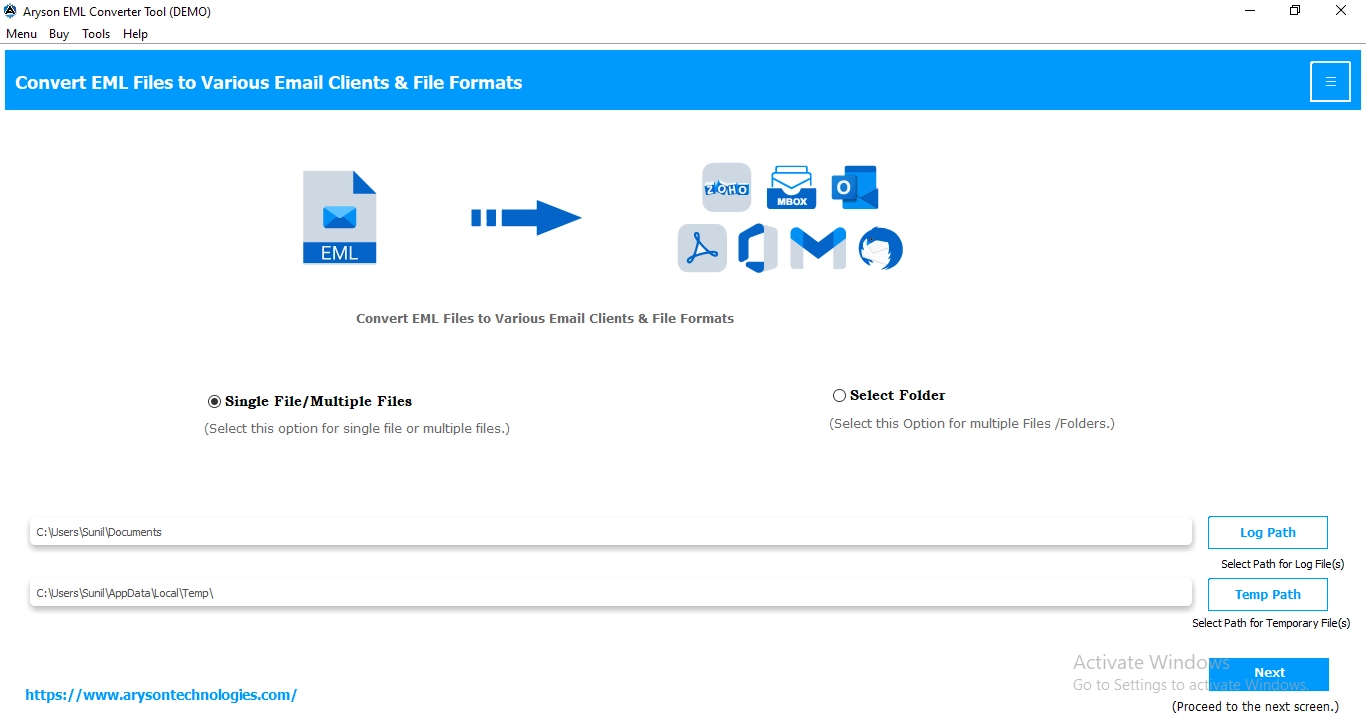
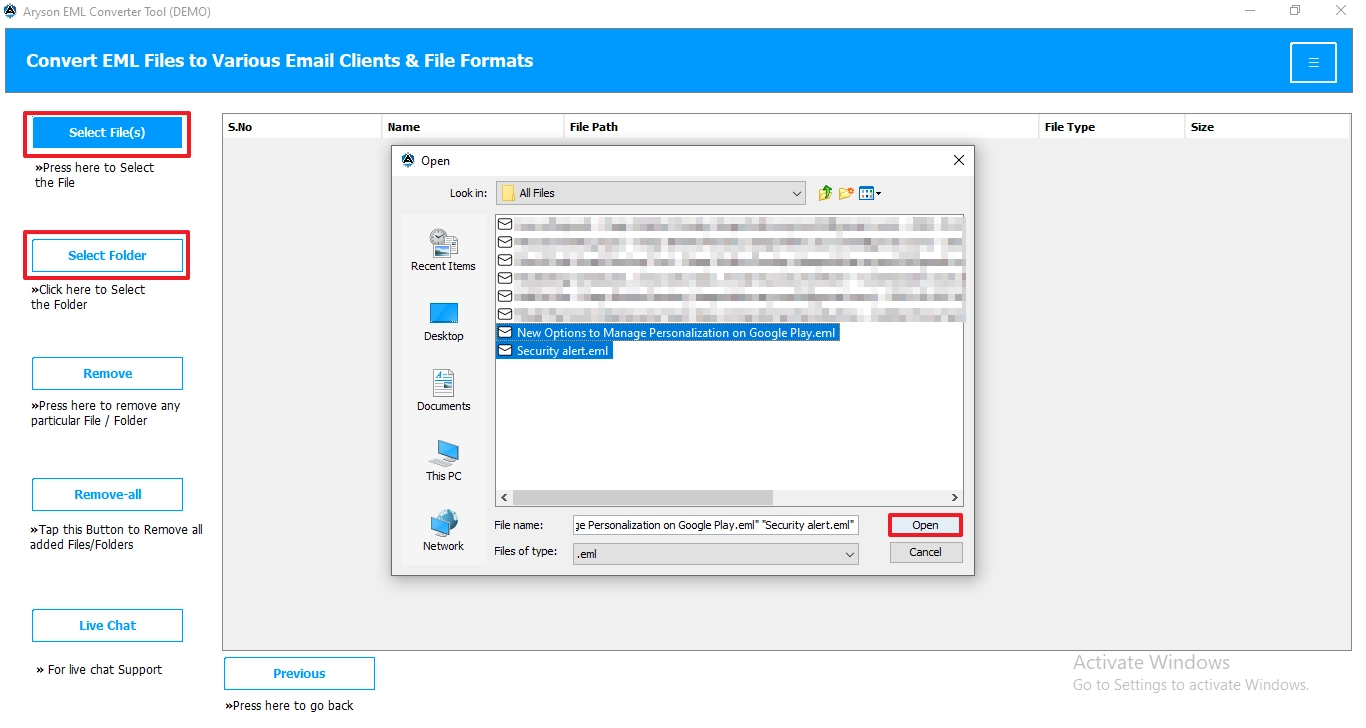
- Click on select file/folder from the left panel and navigate to .eml files >> open.
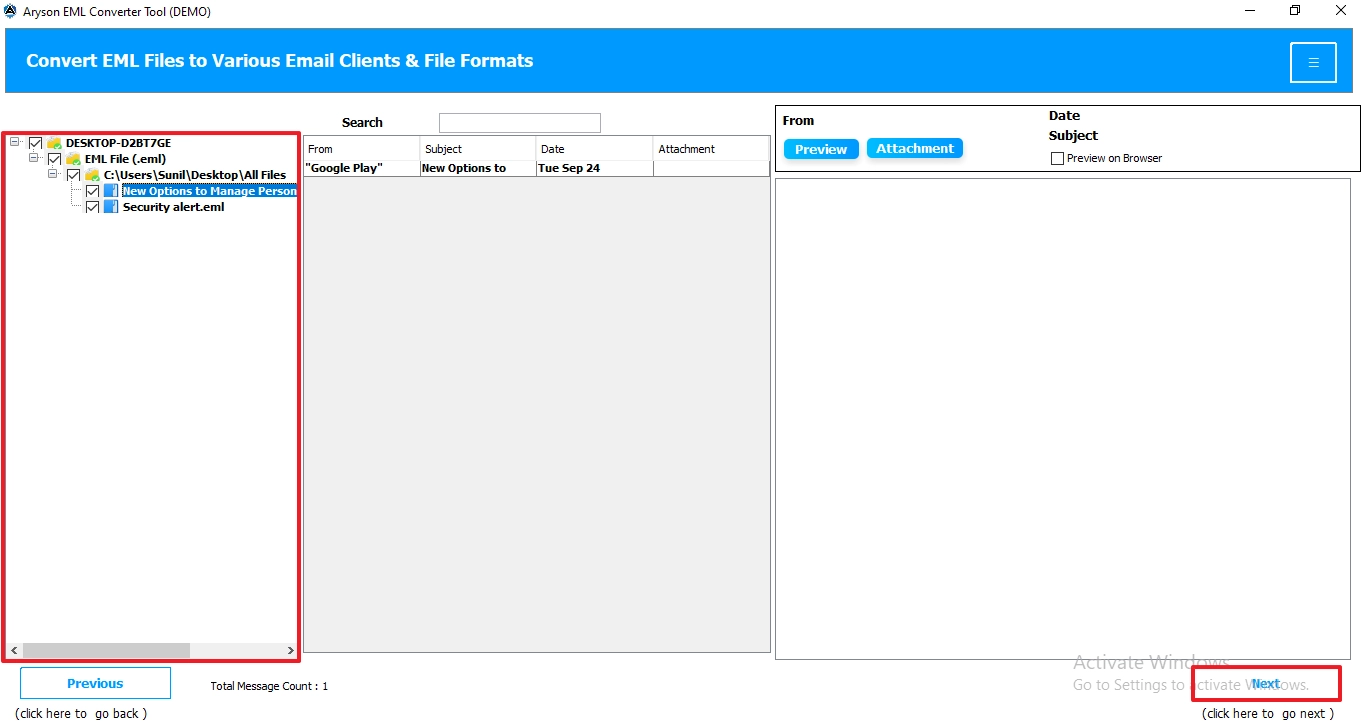
- You can preview the folders and files and the complete details >> Next.
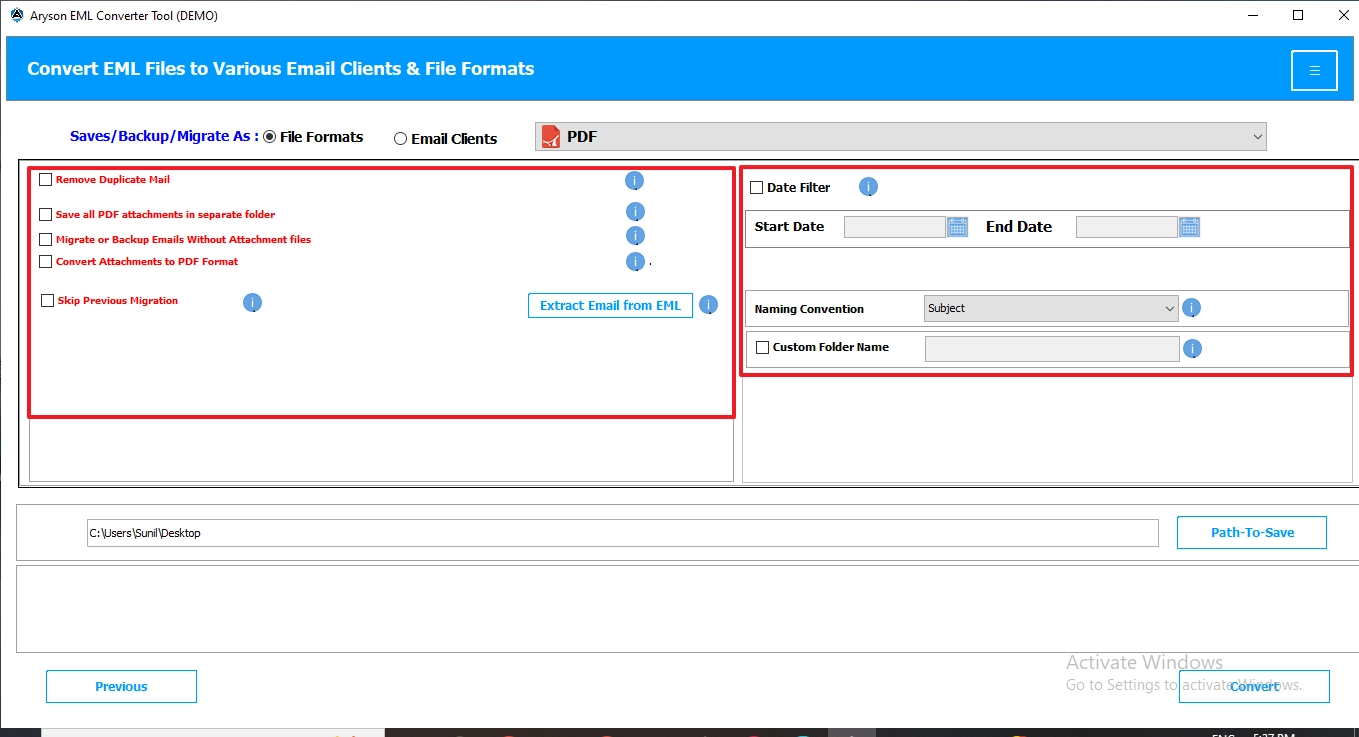
- Tap on the file format and choose PDF as the output format.
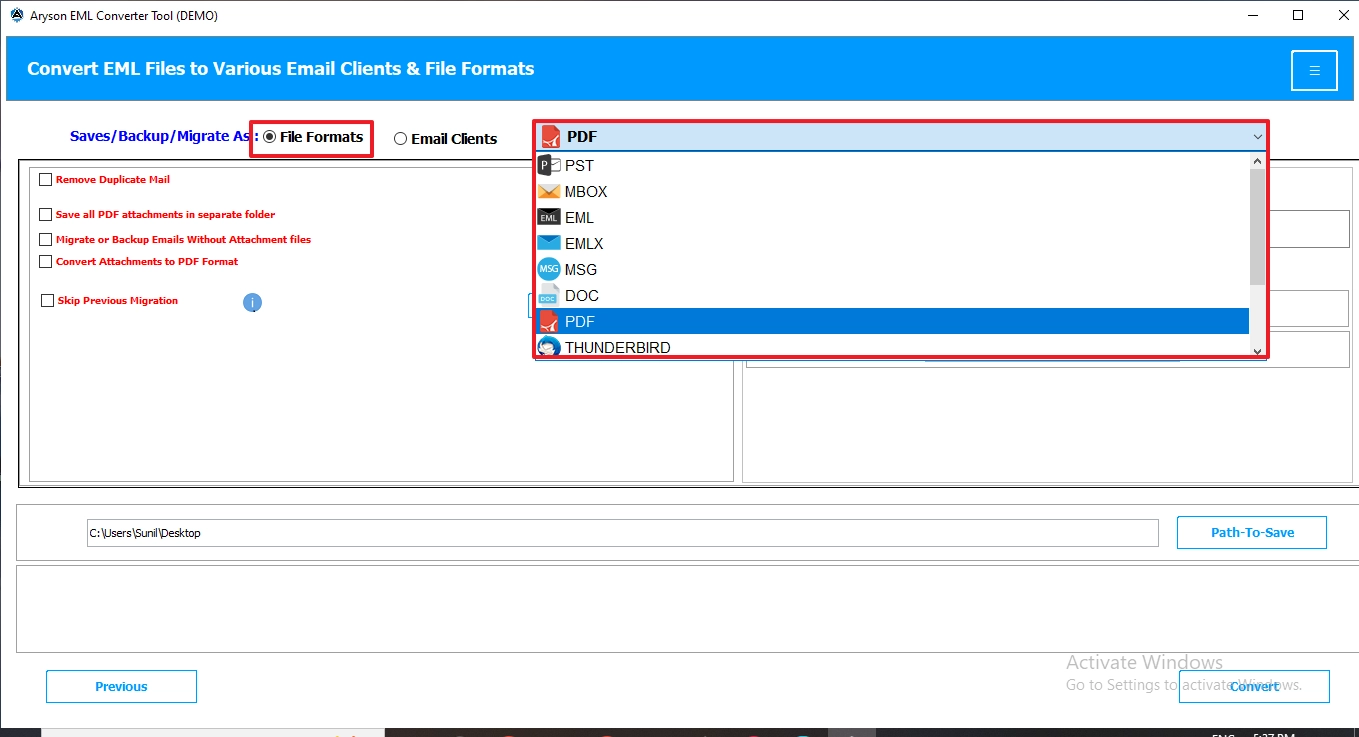
- Apply the additional filter options for the selective data conversion.
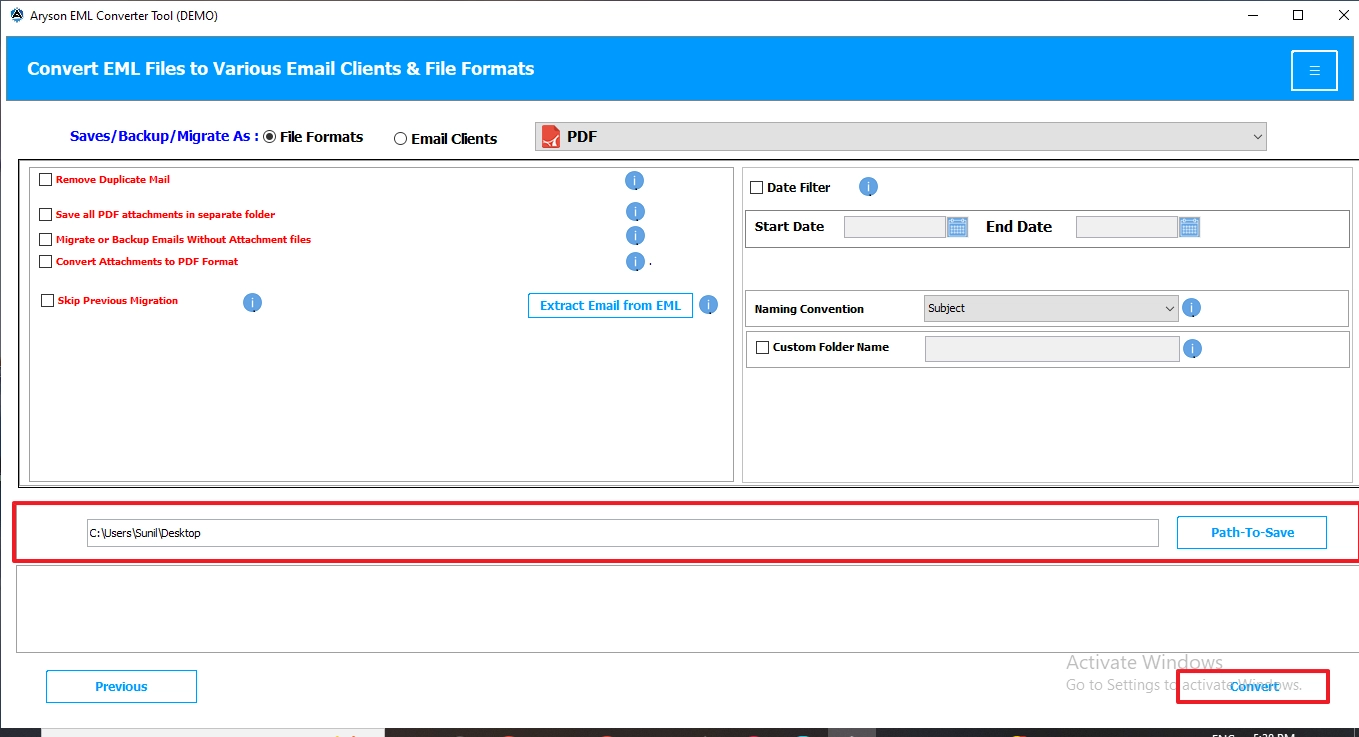
- Click on the destination path and then click on Convert to begin the process.
Pollard Experience
I had more than 2,000 EML files from my old email account that I needed to archive in PDF format for office documentation. I tried to save each email manually through Outlook was taking too much time, and some attachments were missing. Then I used the EML Converter tool, which allowed me to convert Multiple EML to PDF in bulk while preserving attachments and formatting.
Comparison Between the Methods
|
Feature |
Manual Method |
Professional Software |
|
Bulk Conversion |
Limited |
Yes |
|
Attachments |
May Fail |
Preserved |
|
Formatting |
Sometimes Broken |
Maintained |
|
Time Required |
High |
Fast |
Conclusion
In this blog, we have discussed all the reasons why users convert EML file to PDF. PDFs are secured, because of which users prefer to move their data. There are multiple approaches to accomplish the conversion process. We covered the best manual method and professional software that converted data in a simplified way. The manual method is suitable for fewer files because for large files, it affects the attachments. Due to this, we advised users to use professional software if they want to convert bulk files that keep the attachments intact.
Frequently Asked Questions:
Q.1. How can I batch convert multiple EML files to PDF?
Ans. You can batch convert multiple EML files to PDF using professional EML Converter software. It allows you to add complete folders containing EML files and export them to PDF format in a single process while maintaining email formatting and attachments.
Q.2. Will attachments be included when converting EML to PDF?
Ans. Yes, the professional EML Converter tool preserves email attachments during the conversion process. However, manual methods may not always maintain attachments or embedded formatting properly.
Q.3. Can I convert EML to PDF on Windows 10 or Windows 11?
Ans. Yes, you can convert EML files to PDF on both Windows 10 and Windows 11 using email clients like Microsoft Outlook or using EML Converter software for faster and bulk conversion.
Q.4. What is the fastest way to convert EML files to PDF?
Ans. The fastest way to convert EML files to PDF is by using a professional EML Converter tool. It supports bulk conversion, preserves attachments, and saves multiple EML files into PDF format in just a few clicks.
About The Author:

Evren Cole is an expert in Email and Data Management. She has a strong passion for technology and entrepreneurship. In her free time, she enjoys football, music, and reading books.

