Outlook PST Converter

Best Outlook PST Migration Tool for Exporting PST Files to Multiple File Formats and Email Clients.

User Ratings :
(Average Rating 4.9 Based on 514 Reviews)

The MsOutlookHelp Outlook Converter tool helps you convert Microsoft Outlook PST/OST files into various file formats and email clients. You can migrate single or multiple PST files along with emails, attachments, contacts, calendars, notes, and tasks. In the preview panel, you will be able to see plain text, HTML body, MIME, raw HTML, headers, etc. It provides advanced filters such as date range, skip previously exported items, and duplicate removal.
Outlook Converter

Benefits of Outlook PST Converter

  • Convert PST to MBOX, EML, MSG, and 9+ formats.
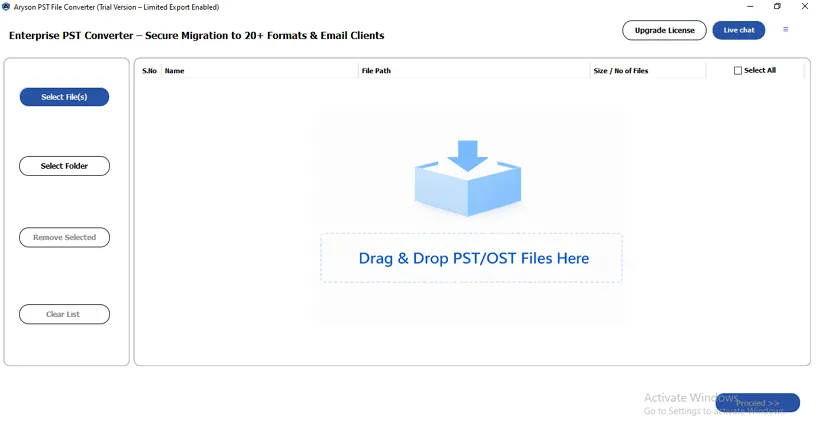
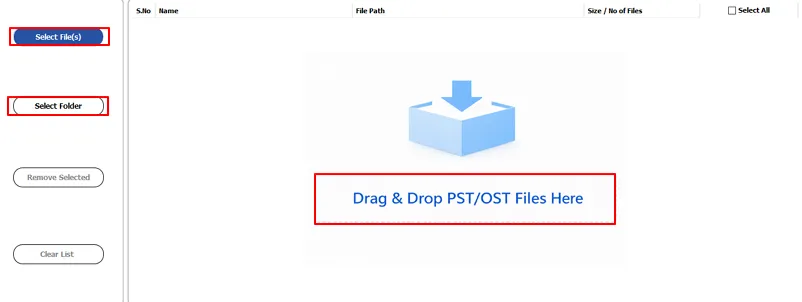
  • Select one or multiple PST/OST files using the file/folder selector or drag & drop.
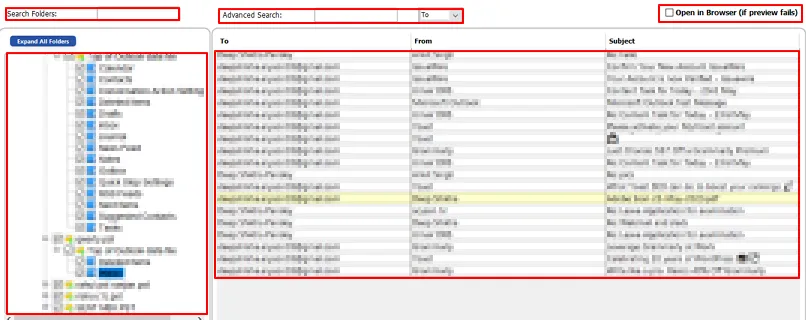
  • PST/OST mailbox advanced search emails by subject, to, and from.
  • View emails, attachments, calendars, tasks, contacts, and notes using the preview panel.
  • Import PST to Office 365, IMAP Server, and other email platforms.
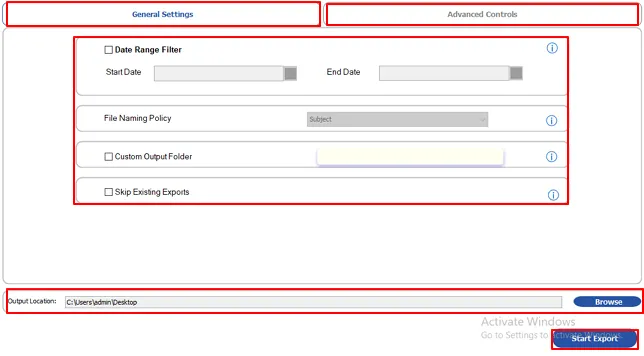
  • Date range filter migrates Outlook PST files within a specific time period.
  • Convert Outlook PST files with attachments, without attachments, or export attachments separately.
  • Map source files to a destination shared mailbox or user mailbox using CSV import.
  • Duplicate detection finds similar files and deletes them based on To, From, Subject, Body, and CC.
  • Maintains the folder structure, emails, and attachments of the Outlook PST files.
  • Split the output PST files into smaller files for easier management.
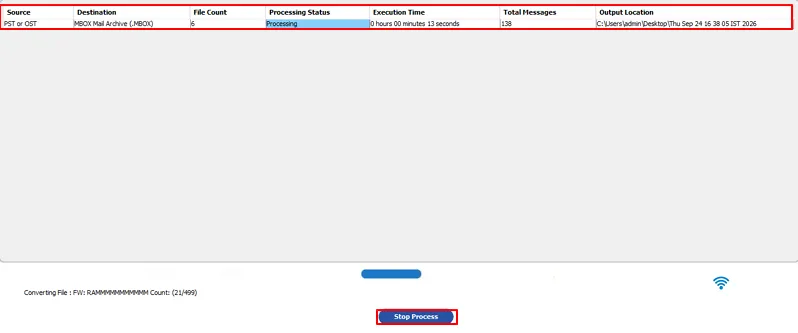
  • Verify migration results in real time through the progress bar & migration report.
  • This software is compatible with Windows 11, 10, 8.1, 8, 7, Vista, XP, & earlier versions.

System Requirements:

    Compatible:

      Application Prerequisites:

      • - Launch the software as "Run as Administrator" if using Windows 11/10/8.1/8/7 or Vista to get better results.

      System Requirements:

      • - 1 GB of free hard disk space required
      • - 4 GB of RAM (8 GB is recommended)
      • - Supports both Intel-based Macs and Apple Silicon Macs

      Version Supports:

      • - macOS 13 Ventura, OS 12 Monterey, OS 11 Big Sur, and below versions.
      • - Outlook version: Microsoft Outlook 2024/2021/2019/2016/2013/2010 and earlier versions.

      Key Features of the PST Converter Tool

      Converts Outlook Emails to MBOX

      Convert PST Files to Different Formats

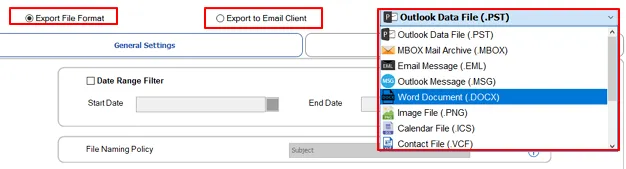
      You can convert PST to PDF, EML, MBOX, MSG, VCF, PST, DOCX, PNG, ICS, CSV, MD, JSON, and Mozilla Thunderbird. The tool exports everything, including emails, attachments, contacts, calendars, notes, and tasks.

      Opens Outlook Emails in Gmail

      Advanced Preview Panel

      A preview panel to review the HTML body, attachments, plain text, raw HTML, calendar, contacts, tasks, notes, MIME, and headers. Users can quickly search emails by To, From, and Subject.

      Saves Outlook PST Files as PDF

      Migrate to Email Platforms

      Outlook Converter allows you to import PST file into Gmail, GoDaddy (Microsoft 365), Outlook.com (Microsoft 365), Google Workspace, and Microsoft 365. The migration is performed securely using secure authentication methods.

      Migrates Outlook Emails to MSG

      Convert PST File in Batch Mode

      Users can convert one file or select several PST files at once to make the process easier for larger data. The tool also helps businesses detect corrupted, locked, or blank PST files to process multiple accounts at once.

      Restriction

      PDF Size Restriction

      Set a maximum PDF size of up to 500 MB to control output size and manage large PDF files efficiently. This also helps prevent oversized documents during conversion, making storage and file sharing more convenient.

      Move All Emails from Outlook to Hotmail

      Split PST Files

      Large PST files can be split into smaller and manageable pieces. This will decrease the chances of corruption and improve efficiency. You can even choose the size of each PST split file as per your needs.

      Opens PST File in Yahoo

      MBOX Segmentation

      The Outlook PST Mailbox Converter tool splits large MBOX files using file size limit or single MBOX/folder. This feature helps users organize, manage, and process large MBOX files more efficiently.

      Buy from Anywhere

      Skip Previously Exported Items

      The Outlook PST file converter tool migrates only new or updated items and excludes items already exported to avoid duplications in the destination mailbox.

      24x7 Technical Service

      Remove Duplicate & Custom Naming

      The software can detect and remove duplicate emails during the conversion based on To, From, Body, Subject, and CC. Use custom folder naming to assign a name of your choice to the output folder.

      Attachments

      Map PST Data with Default Folders

      Use Mapped with Default Folders option to map PST data to default folders, including Inbox, Sent, Drafts, etc., of destination email clients. This makes sure that the PST metadata is mapped to the destination properly.

      User-Oriented Interface

      File Naming Policy

      Outlook PST file converter offers a filter to select a naming policy from the drop-down list to save your output file in a given format. This will help you identify files easily. This filter is available for EML, MSG, DOCX, PNG, ICS, VCF, PDF, MD, and JSON formats.

      authentication

      Authentication Methods

      For Microsoft 365, modern auth, and client ID and secret authentication methods are available. To log in to a Google Workspace account, enter a workspace admin account and a JSON key. For the IMAP server, enter the email address, app password, IMAP server host, and IMAP port.

      filter

      Wide Compatibility

      The PST Converter Tool supports all Outlook versions, including Outlook 2024, 2021, 2019, 2016, 2013, and earlier. Also, it runs smoothly on all Windows versions, like Windows 11, 10, 8, 7, and earlier versions.

      Renaming Option

      Free Trial Version & Simple GUI

      The Outlook PST Converter offers a free trial with a user-friendly interface to ensure that the process is easy for all users. The demo version lets users export 50 items per PST/OST folder.

      Comparison of Outlook Converter: Free vs Full Version

      Software Features Trial Version Full Version
      Convert PST files to 12+ file formats 50 items/folder Complete Mailbox
      Export PST to Email Clients 50 items/folder Complete Mailbox
      Preview PST Mailbox
      Convert PST Files in Bulk
      Date Range Filter
      Duplicate Removal
      Save Attachment Separately
      Folder Mapping in PST to Office 365 & Google Workspace
      Custom Folder Naming
      Split Resultant PST File
      Migrate Emails Without Attachments
      Maintain Original Folder Hierarchy
      Compatible With All Outlook & Windows Versions
      24/7 Technical Support

      What Our Users Say About Us?

      Frequently Asked Questions

      A. When you preview a PST file in MsOutlookHelp Outlook Converter, its complete folder hierarchy is displayed in a tree structure view. The folders are arranged alphabetically, making it easier to locate and review mailbox folders.

      A. Yes, MsOutlookHelp Outlook PST Mailbox Converter can break down large PST files into several chunks.

      A. Yes, if you use the MsOutlookHelp Outlook PST Converter, the original mailbox hierarchy will be preserved during each migration. Folder relationships, subfolders, and mailbox organisation stay intact in the destination.

      A. Yes, the MsOutlookHelp PST Converter Tool generates a comprehensive migration report. It includes processing status, mailbox count, destination details, and the time taken.

      A. Yes, the Date Range filter of the Outlook PST Exporter tool supports selective mailbox conversion operations. Users can enter start and end dates and export emails from specific periods and exclude unnecessary data.

      A. Yes, the software supports batch migration to process multiple PST files simultaneously. This feature saves time while maintaining migration accuracy for large mailbox conversions.

      A. The software automatically detects corrupted, blank, and locked PST files during the loading process. Once detected, it displays a warning panel and skips these files during the migration.

      A. Yes, attachments can be preserved within the emails or saved separately, as you need.