

-
Written By Evren Cole
-
Updated on June 15th, 2026
Migrate Google Workspace to Office 365 Without Downtime
User Query: We currently have 12 users on Google Workspace with one custom domain. What is the simplest way to migrate to Microsoft 365 using an overnight cutover approach, with minimal disruption to users and email services?
Summary:- When migrate from Google Workspace to Microsoft 365 allows organizations to benefit from advanced collaboration. However, businesses worry about email disruptions and user downtime. With the proper migration approach, you can move mailbox data. This guide explains the manual method and the professional MSOutlookHelp Google Workspace Backup Tool for a smooth migration.
Prerequisites: Migrate from Google Workspace to Office 365
- Make sure you have valid admin access to both Google Workspace and Microsoft 365 accounts.
- Take a backup of the important mailbox data to avoid data loss.
- Your internet connection is stable throughout the migration process.
- Moreover, review mailbox sizes & storage limits to estimate the migration duration.
Method 01: Manual Method to Migrate Google Workspace to Microsoft 365
Microsoft 365 provides native migration options that allow administrators to transfer mailbox data from Google Workspace accounts.
- You have to create & configure Microsoft 365 user accounts.
- After that, you have to verify your domain in Microsoft 365 >> Set up migration endpoints.
- Grant required permissions in Google Workspace.
- Create and start a migration batch >> monitor migration progress.
- Update DNS and MX records after migration completion.
Primary Risks of Doing a Manual “Export/Import” Migration
- It takes a lot of time to accomplish the migration for multiple files.
- There is a risk of missing emails, folders, or attachments.
- Moreover, it is difficult to maintain the folder hierarchy and mailbox structure.
- To monitor the large-scale migration can be difficult.
Method 02: Professional Software to Migrate Google Workspace to Office 365
Organizations that handle large-scale migrations often prefer dedicated migration software. The Google Workspace Backup Tool simplifies the process of transferring mailbox data and preserving data integrity. This software also migrate Google Workspace to Gmail and other email services.
|
Steps to Migrate G Suite to Office 365
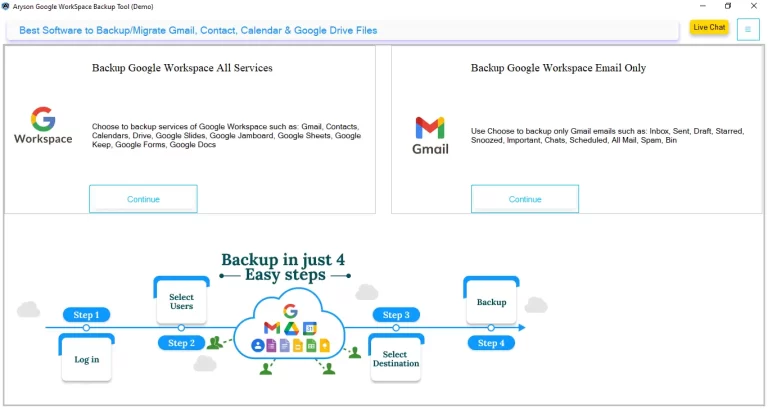
- Install the Google Workspace backup Tool >> run it on your system.
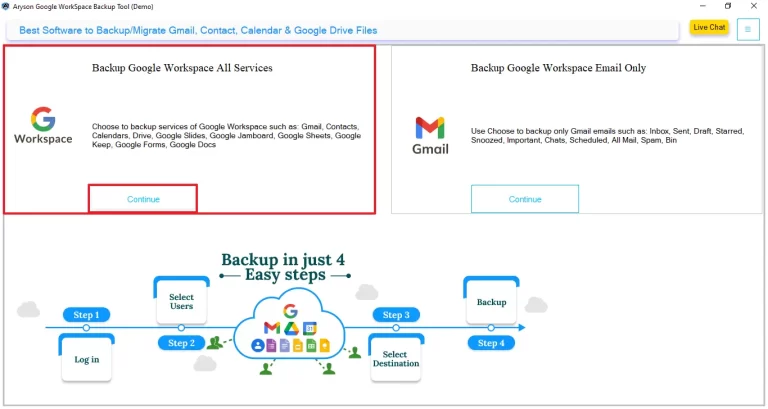
- Select Backup Google Workspace All services >> Continue.
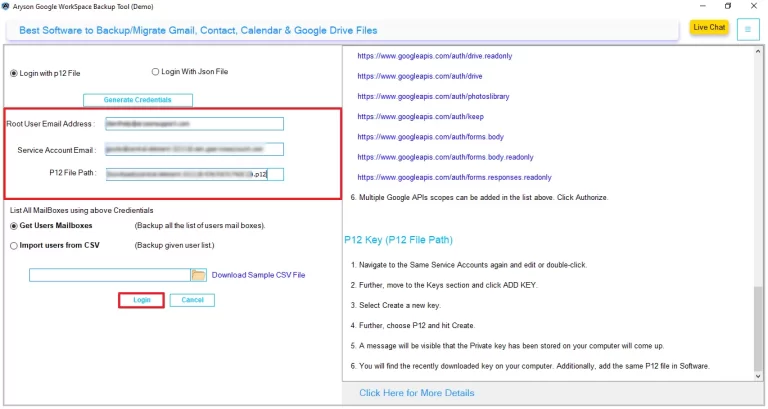
- Choose ‘Login with p12 file‘ and enter the login details.
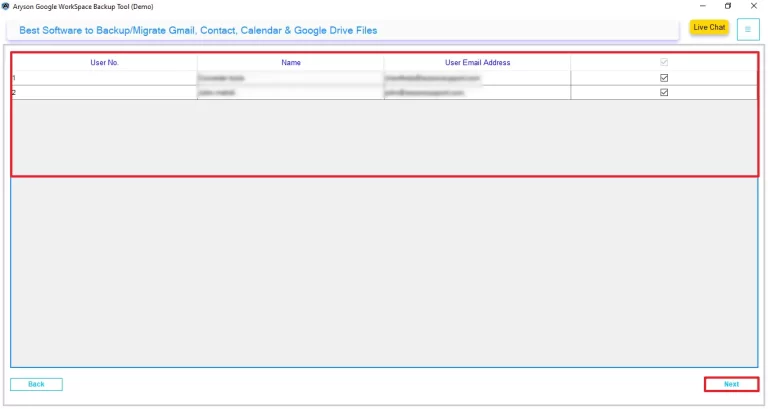
- You can preview & select the users from whom you want to migrate >> Next.
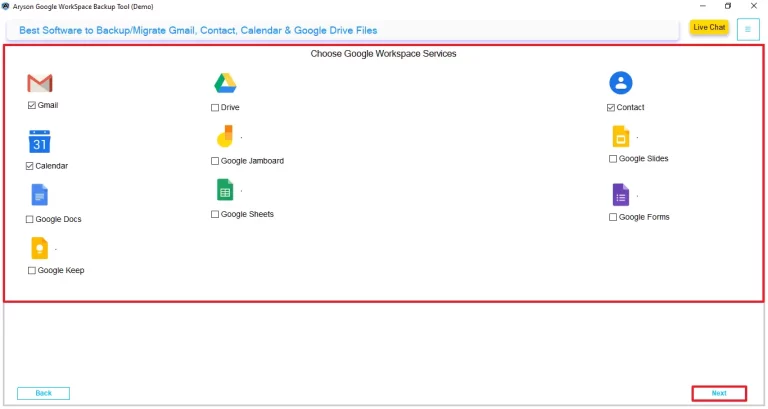
- Move further >> select the Google Workspace services, >> click Next.
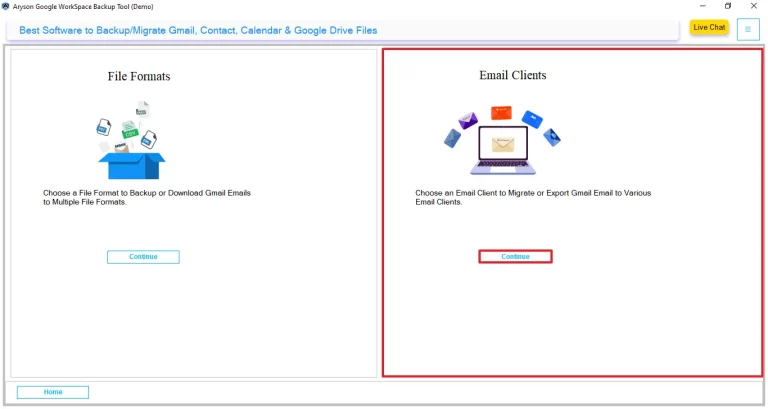
- Tap on Continue under the email client section to choose the destination.
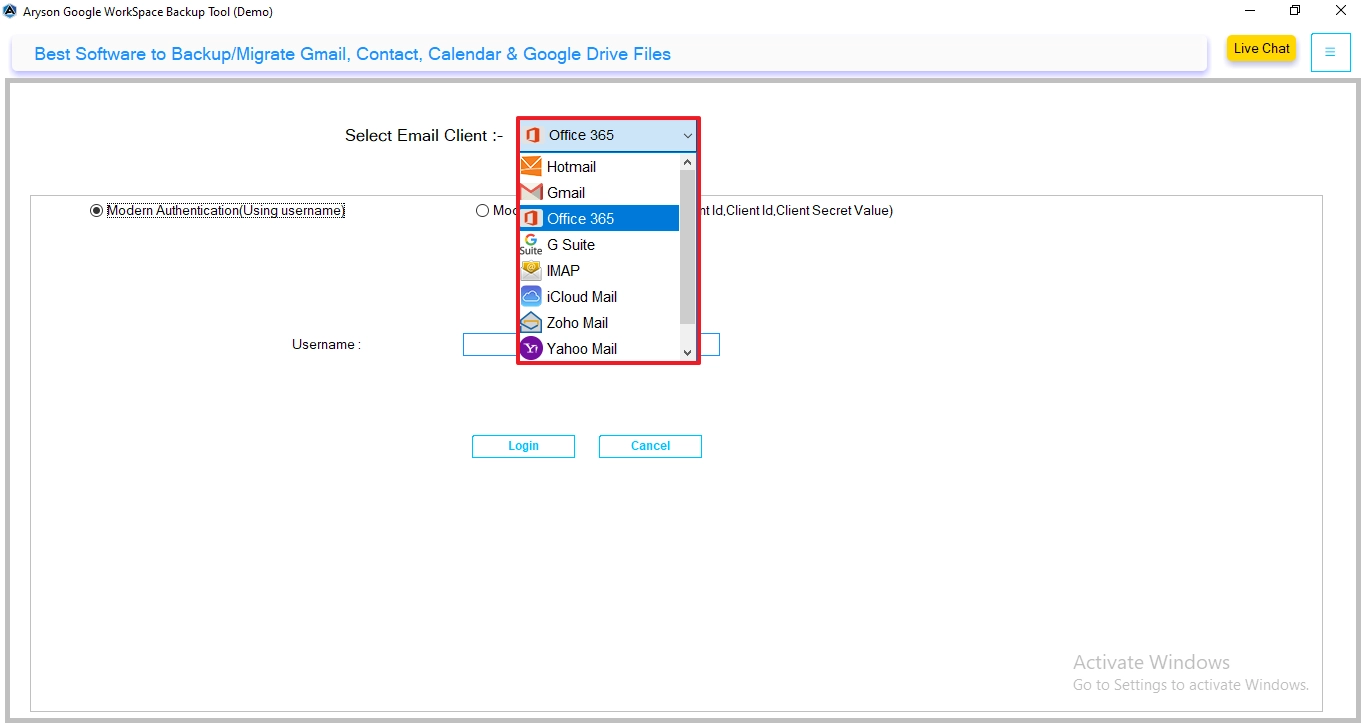
- From the drop-down menu, select IMAP as the output format.
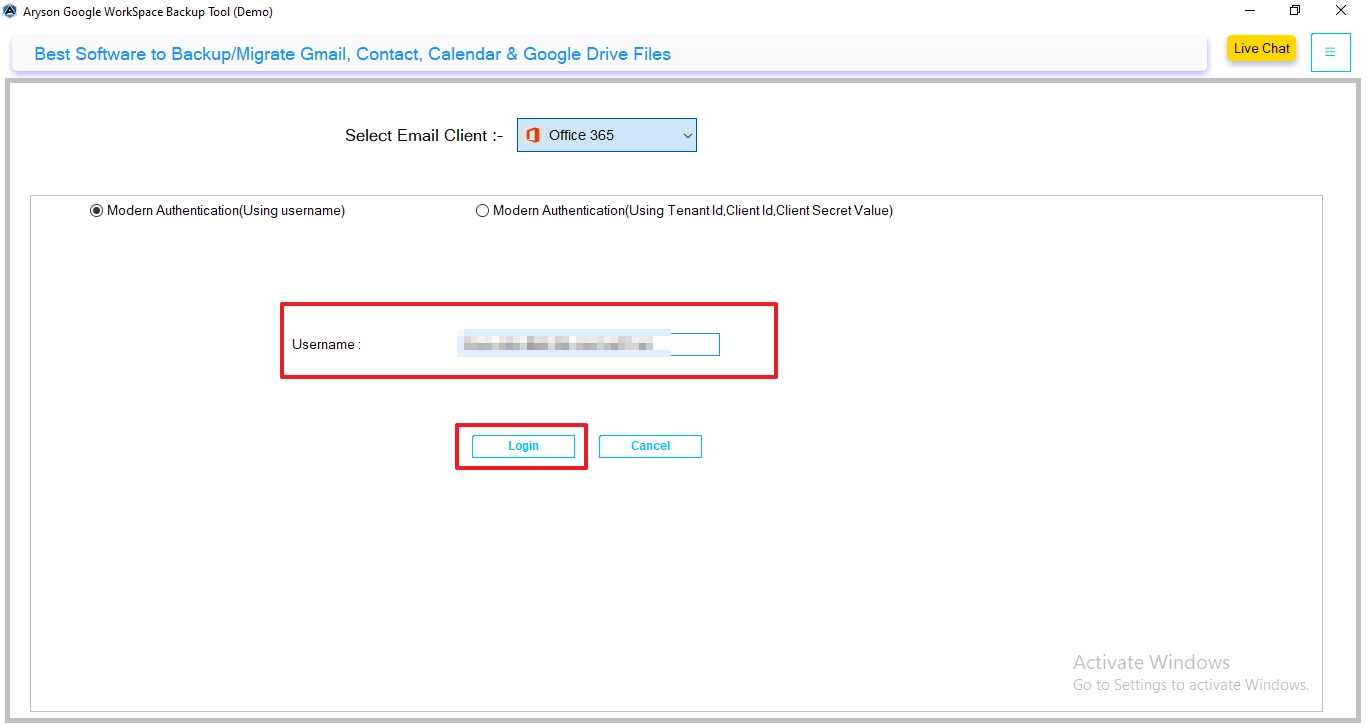
- Provide the email address, app password, host, & port. Tap on login.
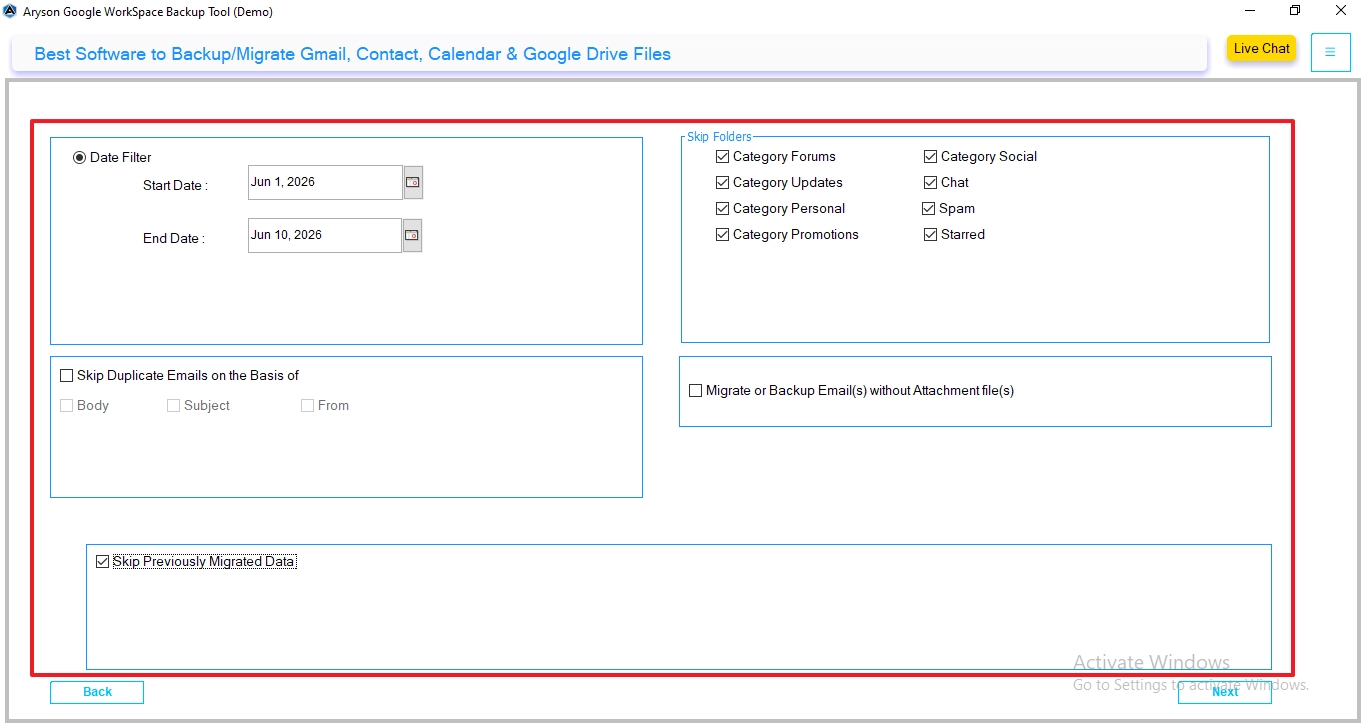
- Moreover, you have to enable the additional filters >> click Next.
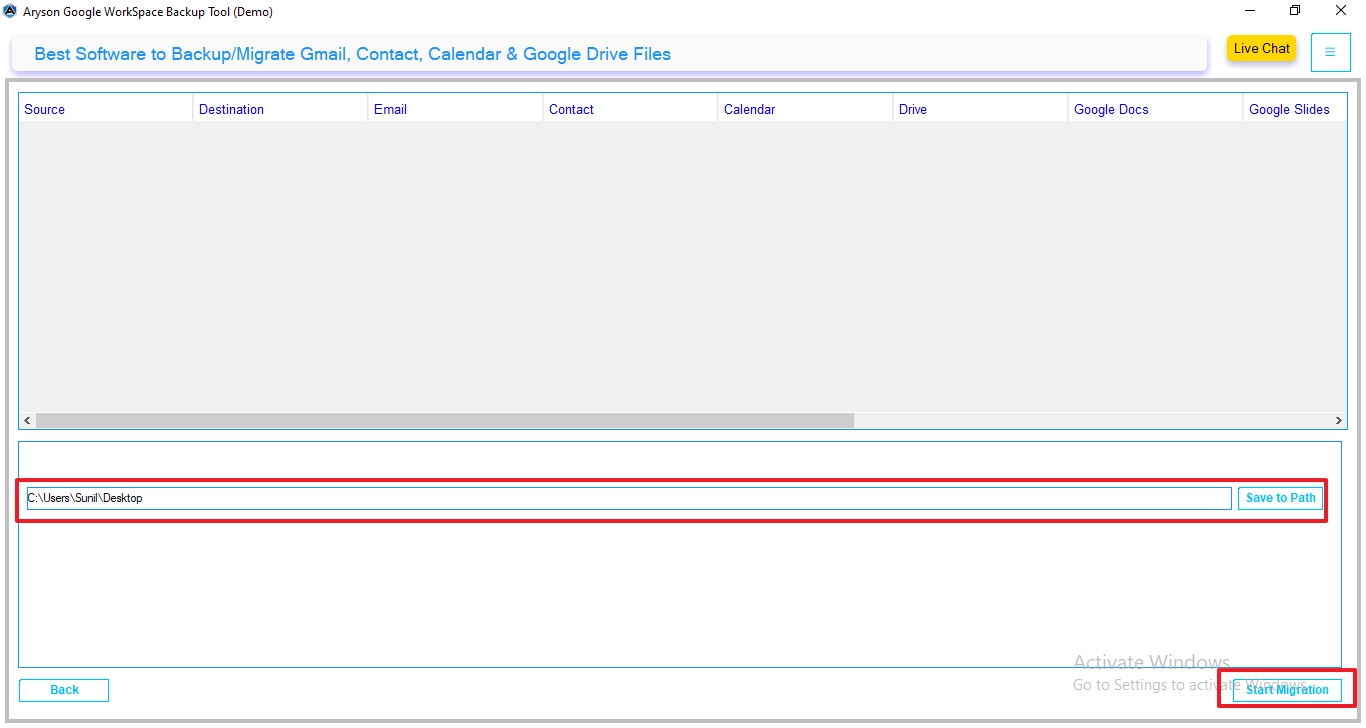
- Hit on ‘save to path‘ to select the resultant destination >> Start Migration.
Daniel’s Success Story
Daniel, an IT manager at a Washington-based software company, needed their 100+ mailboxes to migrate Google Workspace to Office 365 without any downtime. The native method seemed risky due to potential data inconsistencies. With the help of the Google Workspace Backup Tool, he completed the migration smoothly. It preserved all mailbox data & made sure employees could access emails without interruption.
Best Practices for a Zero-Downtime Migration
Make sure you follow the best practices to transfer Google Workspace to Office 365.
- You have to prepare Microsoft 365 accounts before migration.
- Run a pilot migration with a few issues.
- Schedule the final cutover at the time off-business hours.
- Lower DNS TTL values before you change MX records.
- Verify migrated mailbox data before user onboarding.
- Inform users about the migration timelines.
Conclusion
To wrap up, the decision to migrate Google Workspace to Office 365 can provide long-term benefits in terms of efficiency and security. While Microsoft’s native migration approaches support smaller organizations, they frequently require manual configuration. Larger enterprises can use professional tools to simplify the migration process and protect data.
Frequently Asked Questions
Q1. Is it possible to migrate Google Workspace to Office 365 with attachments?
Ans. Yes. Both native Microsoft migration methods and professional migration tools can transfer emails along with their attachments while preserving the original mailbox structure.
Q2. Can I migrate 1,000+ Google Workspace users to Office 365 in batches?
Ans. Yes. Microsoft 365 supports migration batches, and professional migration tools are specifically designed to handle large-scale migrations involving thousands of user accounts.
Q3. Why are businesses migrating from Google Workspace to Office 365?
Ans. Businesses migrate to gain access to advanced security features, Microsoft Teams integration, SharePoint collaboration, Outlook functionality, and centralized administration capabilities.
Q4. What are the biggest challenges users face during this migration?
Ans. Common challenges include mailbox size limitations, permission configuration, DNS changes, migration downtime, data integrity concerns, and managing large numbers of user accounts.
Q5. Can I resume an interrupted Google Workspace to Office 365 migration?
Ans. Yes. Professional software supports incremental synchronization and allows administrators to resume interrupted migrations without duplicating previously transferred data.
Q6. What is the best method to transfer Google Workspace to Office 365?
Ans. The best method depends on the organization’s size and requirements. Small organizations may use Microsoft’s built-in migration tools, while medium and large businesses typically prefer dedicated migration software for faster, more reliable, and scalable migrations.
About The Author:

Evren Cole is an expert in Email and Data Management. She has a strong passion for technology and entrepreneurship. In her free time, she enjoys football, music, and reading books.

