

-
Written By Evren Cole
-
Updated on June 14th, 2026
Complete 2026 Guide to Migrate From Google Workspace to ProtonMail
User Query: Hi everyone! I use a custom domain with Google Workspace and want to move it to Proton Mail along with all my emails, contacts, and calendar data. I tried Easy Switch, but some emails and calendar events didn’t transfer. What’s the most reliable way to migrate everything without losing data?
Summary:- When a user plans to migrate from Google Workspace to Proton Mail is generally considered the popular choice for better privacy and security. However, transfer emails, contacts, and custom domain settings without data loss is difficult. This complete 2026 guide explains the safest and most effective way to migrate data, which includes the MSOutlookHelp Google Workspace Backup Tool. It makes sure of a smooth and hassle-free migration.
What Data can be Migrate Emails from Google Workspace to ProtonMail?
- Transfer all emails along with their attached files without any loss of important data.
- Migrate contact information, which includes names, email addresses, & phone numbers.
- Preserve email organization when transferring existing labels & folder structures.
- Migrate multiple user mailboxes while maintain individual mailbox data.
Pre-Migration Checklist to Follow When Migrate from Google Workspace to ProtonMail
- Access your Google Workspace Data
- Verify Proton Mail subscription requirement
- Backup Google Workspace data
- Prepare your custom domain
- Inform users and stakeholders
Manual Method to Transfer Google Workspace to ProtonMail
The most effective manual method is to use Proton Mail’s Easy Switch feature. It allows users to import emails, contacts, and calendars directly from their Google Workspace account.
Steps for Moving from Google Workspace to Proton Mail
- Sign in to your Proton Mail >> make sure you have enough storage for the migration.
- Go to Settings >> Easy Switch in Proton Mail & select Google Workspace/Gmail as the source account.
- Log in with your Google Workspace credentials >> permit Proton Mail to access your emails, contacts, and calendars.
- Select items you want to migrate and begin the Import process.
- Wait for Proton Mail to transfer your data.
- Add your domain to Proton Mail, verify ownership,>> update records to route new emails through Proton Mail.
- After completion, verify that everything has been transferred successfully.
Limitations of the Manual Method
- It is suitable for small data migration.
- The method may miss some items at the time of migration.
- It takes a longer time to complete the process.
- User cannot migrate selective data with this method.
Professional Method to Migrate from Google Workspace to ProtonMail
The Google Workspace Backup Tool is designed to securely backup and migrate data, which includes emails, contacts, and other mailbox data. It enables users to export Google Workspace to PST and other file formats and email clients. It makes sure to preserve a folder hierarchy and data integrity.
This software supports a bulk migration and a large mailbox process. It makes it suitable for both individuals and organizations. With its simple user interface and advanced filter options, the migration task becomes easier. If users plan to switch to another email client, they can follow the Migrate Google Workspace Emails to an IMAP guide.
Process to Switch from Google Workspace to ProtonMail
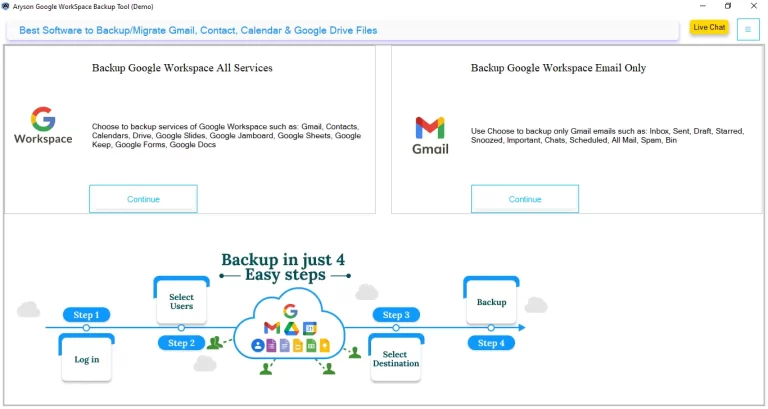
- Launch the Google Workspace backup Tool and run it.
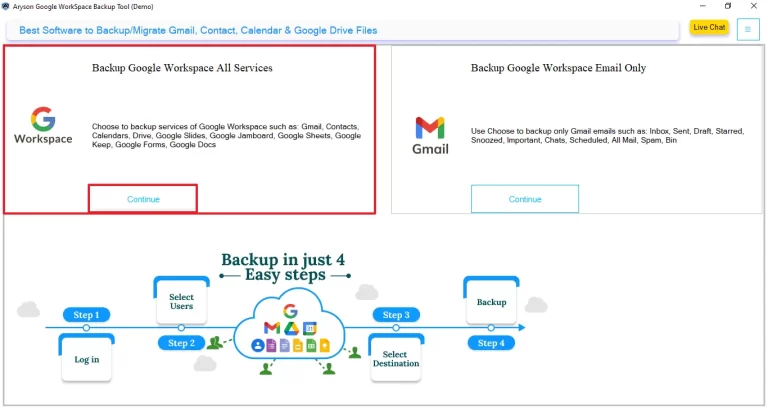
- Choose Backup Google Workspace All services >> Continue.
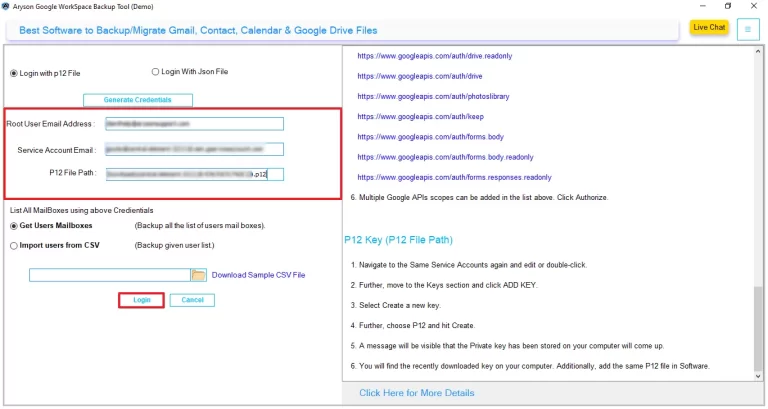
- Select ‘Login with p12 file‘ and enter the login details.
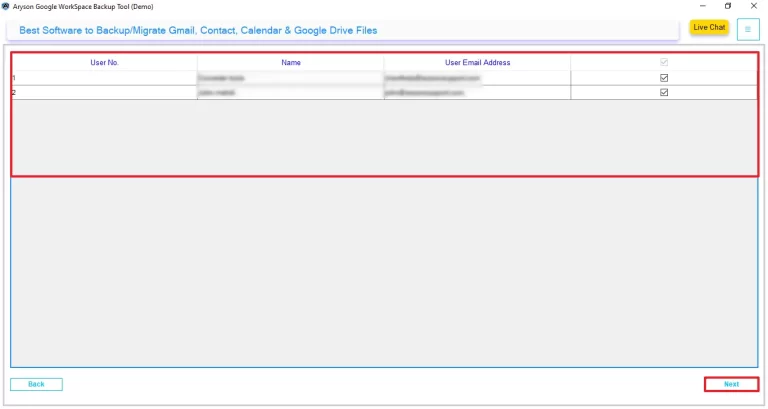
- Preview and select the users from whom you want to migrate >> Next.
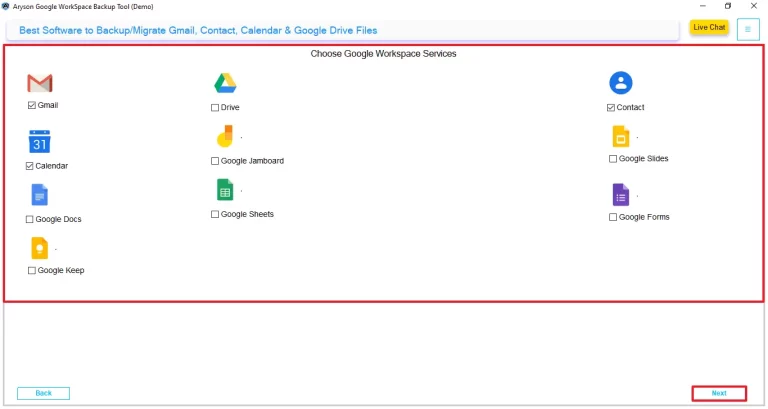
- Proceed and select the Google Workspace services, and click ‘Next‘ to move ahead.
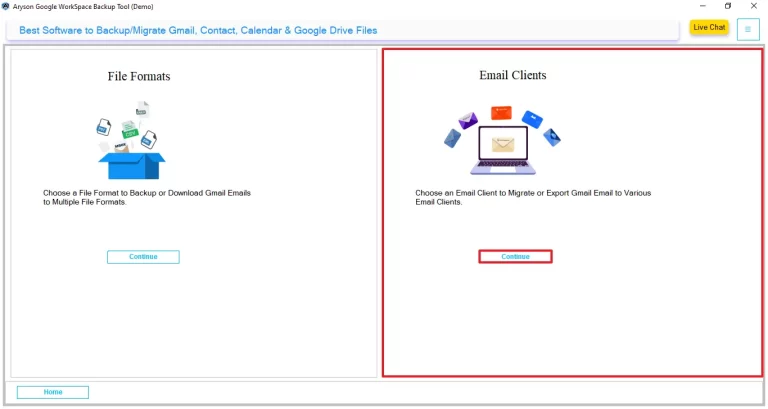
- Click on Continue under the email client section to choose the destination.
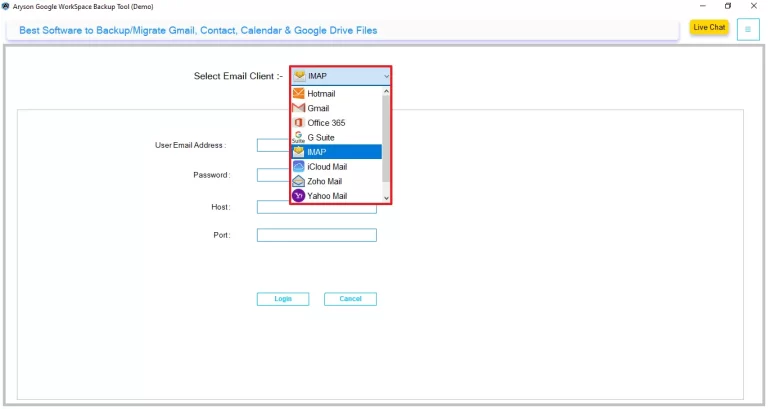
- From the drop-down menu, select IMAP as the output format.
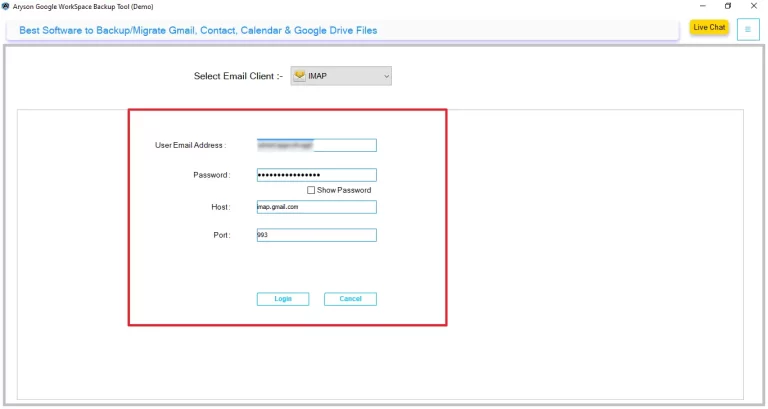
- Enter the email address, app password, host, and port, and tap on login.
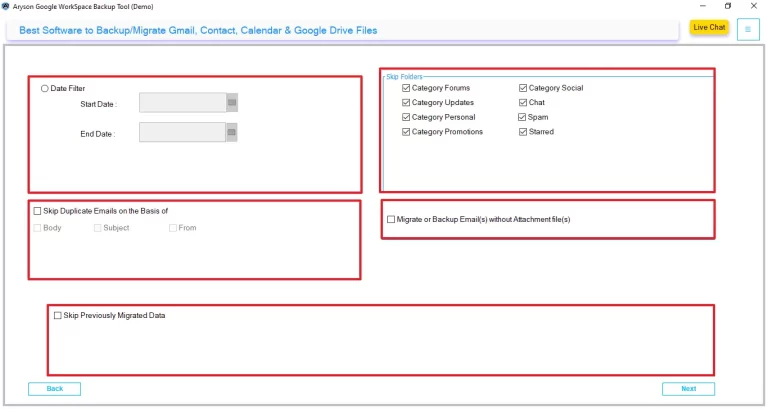
- Afterward, enable the additional filters >> click Next.
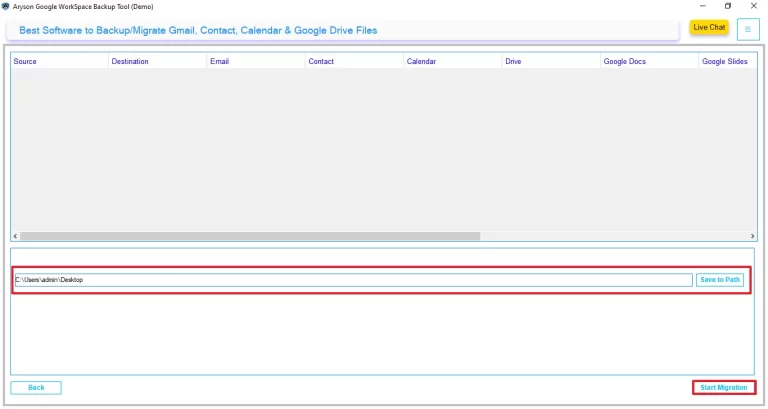
- Tap on ‘save to path‘ and select the resultant file destination >> Start Migration.
Conclusion
When users migrate emails from Google Workspace to Proton Mail, offers an improves privacy and data control. By properly transfer emails, contacts, and custom domain settings, you can avoid data loss. With the right migration method, move to Proton Mail becomes a smooth and reliable process.
Frequently Asked Questions
Q1. How do I transfer Google Workspace to Proton Mail with attachments?
Ans. You can transfer Google Workspace emails with attachments using Proton Mail Easy Switch or a Google Workspace Migration Tool. These methods preserve email content, attachments, folder structures, and metadata during the migration process.
Q2. Is Proton Mail a real alternative to Google Workspace for businesses?
Ans. Yes, Proton Mail is a strong alternative for businesses that prioritize privacy, security, and encrypted communication. While Google Workspace offers a broader productivity suite, Proton Mail focuses on secure email, calendar, VPN, and cloud storage services.
Q3. Can I migrate a 50GB or 100GB Google Workspace mailbox to Proton Mail without data loss?
Ans. Yes, large mailboxes can be migrated successfully with the Google Workspace Backup Tool. For mailboxes larger than 50GB, it is recommended to use a professional migration solution and verify data after the transfer to make sure accuracy.
Q4. Can Proton Mail and Google Workspace be used together on the same domain?
Ans. Yes, both services can temporarily coexist during a migration project. However, email delivery depends on your MX record configuration, so careful planning is required to avoid disruptions while transitioning users between platforms.
Q5. What are the most common challenges when migrating from Google Workspace to Proton Mail?
Ans. Common challenges include missing emails, attachment transfer issues, calendar synchronization problems, large mailbox migration delays, DNS propagation delays, and preserving folder or label structures during the migration.
Q6. Is ProtonMail compliant with GDPR and HIPAA?
Ans. Proton Mail is designed to comply with GDPR and follows strict privacy regulations. However, HIPAA compliance depends on your organization’s implementation and requirements, so businesses handling protected health information should review Proton Mail’s latest compliance documentation before adoption.
About The Author:

Evren Cole is an expert in Email and Data Management. She has a strong passion for technology and entrepreneurship. In her free time, she enjoys football, music, and reading books.

