

-
Written By Evren Cole
-
Updated on July 12th, 2025
Best Ways to Open OLM File on Mac Without Outlook
A .olm file is the archive format Outlook for Mac uses to store emails, contacts, and calendars. However, it is not a simple process to open & read OLM files on Mac or Windows. You have to convert OLM files to Outlook-supported formats (OST or PST). This blog will show you the simple methods with the professional OLM Converter Tool to open OLM file without Outlook. They offer you a quick, precise, and 100% accurate solution.
What’s an OLM File?
An OLM file holds your Outlook data: Emails, Contacts, Calendar events, Tasks, and notes. It’s made for Outlook for Mac. However, you can still access it without Outlook.
Why Open OLM Files on Mac Without Outlook?
- Firstly, you may have moved Macs and don’t want to install Outlook.
- Many users prefer to access data in Apple Mail, Thunderbird, or another app.
- Otherwise, one might simply want to review old mail without extra software.
Manual Method to Open OLM File Without Outlook for Mac
There is no direct manual method available to open your OLM file on Mac without Outlook. To view the content, you first need to convert the OLM file into an accessible format like MBOX. That is supported by Apple Mail and other email clients. However, there is only one method available to convert OLM files to MBOX without Outlook using the OLM Converter Tool. Moreover, it can also convert OLM files into Outlook-supported formats like PST and OST for easier access on Windows.
Use Dedicated Software to Open OLM File Without Outlook
You can open an OLM file without Outlook by converting it to a readable format like PST or PDF. For a quick solution, you can use the MSOutlookHelp OLM Converter Tool, which doesn’t need Outlook installation.
This powerful utility allows you to preview all your OLM file data, including emails, contacts, calendars, and attachments, without Outlook. In addition, you can convert OLM files to MBOX, Apple Mail, and other formats (File formats & email clients). This tool maintains the data’s originality, privacy, and integrity during the migration process. Moreover, it offers several advanced features to make the process hassle-free.
Why Choose OLM Converter Tool?
This professional OLM Converter is developed by MSOutlookHelp to help users in OLM conversion. It gives many advanced features, such as:
- Effortlessly open bulk OLM files without Outlook installation.
- You can preview the OLM file data without any hassle.
- Convert OLM to PST, MBOX, and other formats.
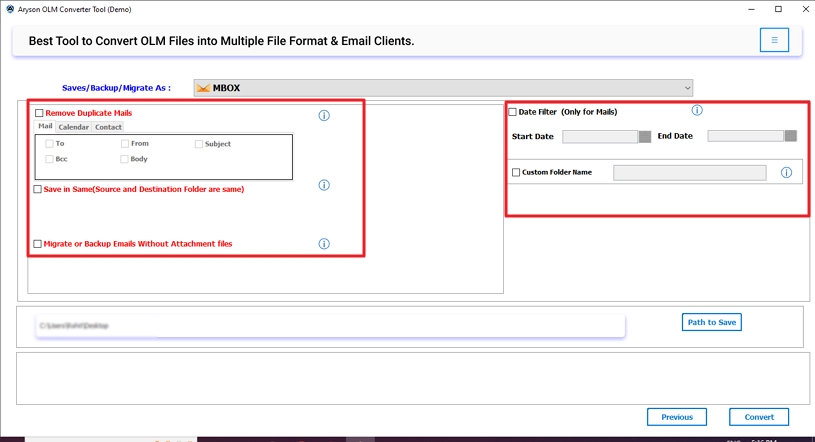
- Also, apply the Remove Duplicate feature to delete duplicate emails.
- Basically, the Date Filter is used for selective email migration.
- Offers a simple interface, which means tech & non-tech users can easily use it.
How to Open OLM File without Outlook Using OLM Converter?
- Firstly, launch the MS Outlook Help OLM Converter Tool and click Continue.

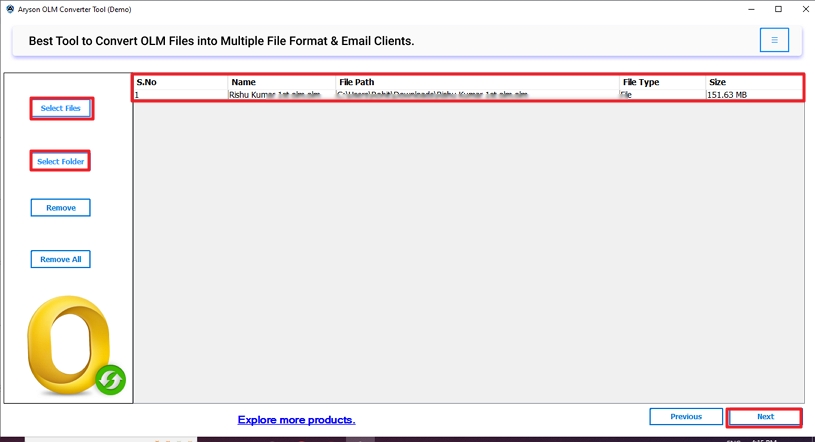
- Next, choose either Select Files or Select Folders to add OLM files.
- Select File: To add a single OLM file (Press again to add more files)
- Select Folders: To add an OLM folder that contains multiple OLM files.
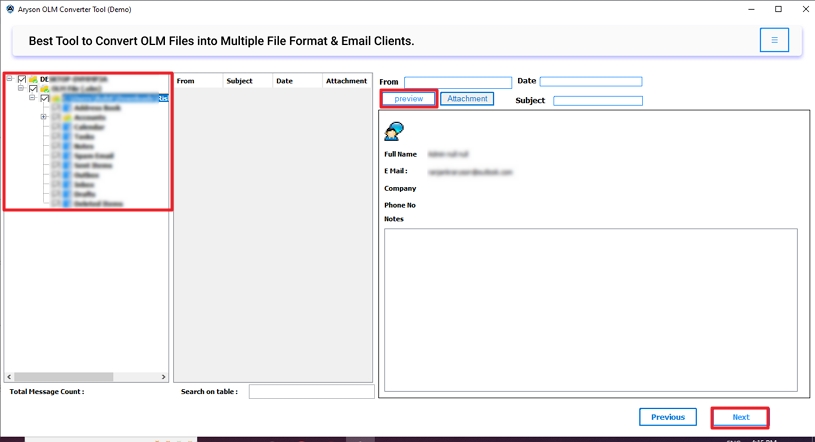
- Then, you can preview the OLM file data, including attachments. Click Next.
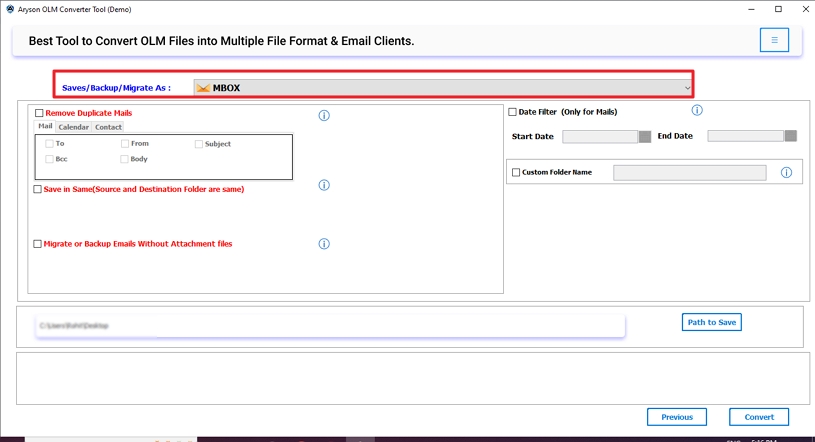
- After that, choose MBOX (Mac preferred) as the saving option.
- Further, apply advanced features and filters based on your needs.
- Lastly, click Convert to initiate the migration process.
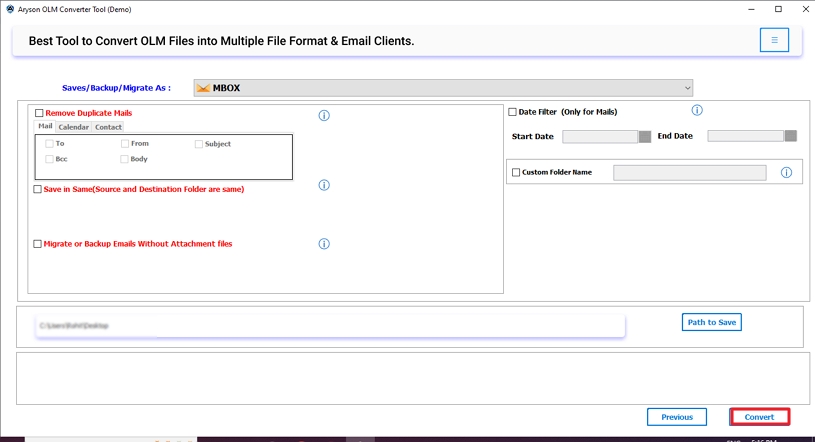
After these simple steps, you can easily open your OLM files without Outlook on Mac.
Important Note: Try the demo (Free) version of this tool to explore its features and functions.
Conclusion
In this technical blog post, we have discussed several methods to open OLM file without Outlook. Although there is no direct manual method available to perform this process on a Mac. However, you can use the professional tool to open your OLM files without Outlook. Also, save them into Mac-supported formats, like MBOX and Apple Mail. Additionally, if you have any queries related to this tool, feel free to ask. Our 24/7 technical support is available to resolve your query instantly.
Frequently Asked Questions
Q1. How do I open an OLM file on Windows?
Ans: You can open an OLM file on Windows by converting it into Outlook-supported file formats, like PST or OST. For this conversion, you can use the OLM Converter Tool.
Q2. Can I open an OLM file in Excel?
Ans: No, Excel does not natively support OLM files. However, you can first convert the OLM file into CSV format using the OLM Converter Tool. Once converted, open the CSV file in Excel to view contacts and other structured data.
Q3. How do I extract emails from OLM?
Ans: You can extract emails from an OLM file by using a professional OLM Converter Tool. After conversion, these files can be opened in email clients like Apple Mail, Thunderbird, or Windows Mail, depending on the format chosen.
About The Author:

Evren Cole is an expert in Email and Data Management. She has a strong passion for technology and entrepreneurship. In her free time, she enjoys football, music, and reading books.

