

-
Written By Evren Cole
-
Updated on June 4th, 2026
Open PST File Without Outlook – 2026 Complete Guide
User’s Query: I need to access a former employee’s PST email archive without adding it to Outlook. Is there a reliable PST viewer that lets me open, search, and read PST files without Outlook?
Summary: Most of the users rely on Microsoft Outlook to access PST files. However, not every user has Outlook installed on their system. In such cases, users often look for ways to open PST file without Outlook. Whether you want to access archived emails or view PST files on another system, this guide provides complete and updated methods for 2026. Also, we will discuss the PST Viewer Software that keeps the users’ data safe and secure
TL;DR: Enterprises need to access PST data independently in situations where Outlook crashes due to profile corruption. To open a PST file without Outlook, use Mozilla Thunderbird or a professional tool.
What is a PST file?
A PST (Personal Storage Table) file is an Outlook data file used to store emails, contacts, and other mailbox items. These files are commonly used for backups and email archives. However, when you try to open an Outlook PST file without Outlook, it can be difficult, especially for non-technical users.
Why Open or Read PST File Without Outlook?
There are several reasons why users want to open Outlook PST file without Outlook:
- When Outlook is not installed on the system.
- There is a need to open large PST file without performance issues.
- Moreover, when you want to access PST data on macOS (open PST file on Mac without Outlook).
- Most of the users avoid Outlook due to crashes or licensing costs.
- When users want a quick preview of emails without full configurations.
Best Solution to Open Corrupt PST File without Outlook
If the PST file is corrupted or inaccessible, then you need to use Outlook PST Recovery, which repair corrupt PST file, including all email items, without Outlook.
Signs of a Corrupt or Inaccessible PST File
Before you open a PST file, it is important to identify whether it is corrupted. Here are some signs that include:
- When Outlook fails to open the PST file.
- An error message appears like, “File is not a personal folders file.”
- Moreover, missing emails, contacts, or folders.
- When there is a slow performance or frequent crashes.
- Additionally, the PST file size exceeds recommended limits.
Best Methods to Open PST File
Now, we will explore the most appropriate methods that accomplish the conversion process with ease.
- Use Mozilla Thunderbird
- Use PST Viewer
Method 01: Use Mozilla Thunderbird Manually
Since Thunderbird does not support PST files directly, you must first convert PST to MBOX and then import it. Most of the users choose to import PST file into Thunderbird because it provides a free way to access Outlook emails without installing Microsoft Outlook.
Step 01: Launch Mozilla Thunderbird
- To initiate, download, and launch Mozilla Thunderbird on your system.
- After that, open Thunderbird and then click on Account Settings.
- Then, add your email account and wait for the mailbox to sync completely.
- Now, go to Tool >> click on Add-ons and Themes and search for ImportExportTools NG.
- Next, you need to restart Thunderbird (this add-on allows you to import MBOX files).
Step 02: Convert PST to MBOX Format
As Thunderbird cannot directly read a PST file without Outlook, you need a conversion tool.
- Thereafter, convert PST to MBOX and add the PST file.
- Afterward, choose MBOX as the output format and start the conversion.
- Finally, save the converted file.
- Again, open Thunderbird and right-click on Local Folders.
- Subsequently, you need to select the ImportExport NG and click the Import MBOX file.
- Then, choose to directly import one or more MBOX files.
- Next, browse and select your converted MBOX file and click Open.
- At last, the imported emails will appear under local folders.
Limitations of the Manual Method:
While manual solutions are useful, they come with several drawbacks:
- In this method, firstly, Thunderbird requires PST to MBOX conversion.
- The Google Workspace method indirectly depends on Outlook.
- Moreover, these methods are time-consuming for large PST files.
- Subsequently, there is a risk of data loss or formatting issues.
- Neither manual method can handle corrupt PST files effectively.
Method 02: Use a Free PST Viewer Tool
The MSOutlookHelp PST File Viewer is an ultimate freeware program that analyzes PST and mailbox data items while enabling users to see and read PST file contents such as contacts, emails, calendars, journals, tasks, and events, among other things. Additionally, you can open a PST file without Outlook. Also, this software is available for Mac, so you can easily open PST file on Mac without Outlook.
- Initially, download the PST File Viewer Software on your system.
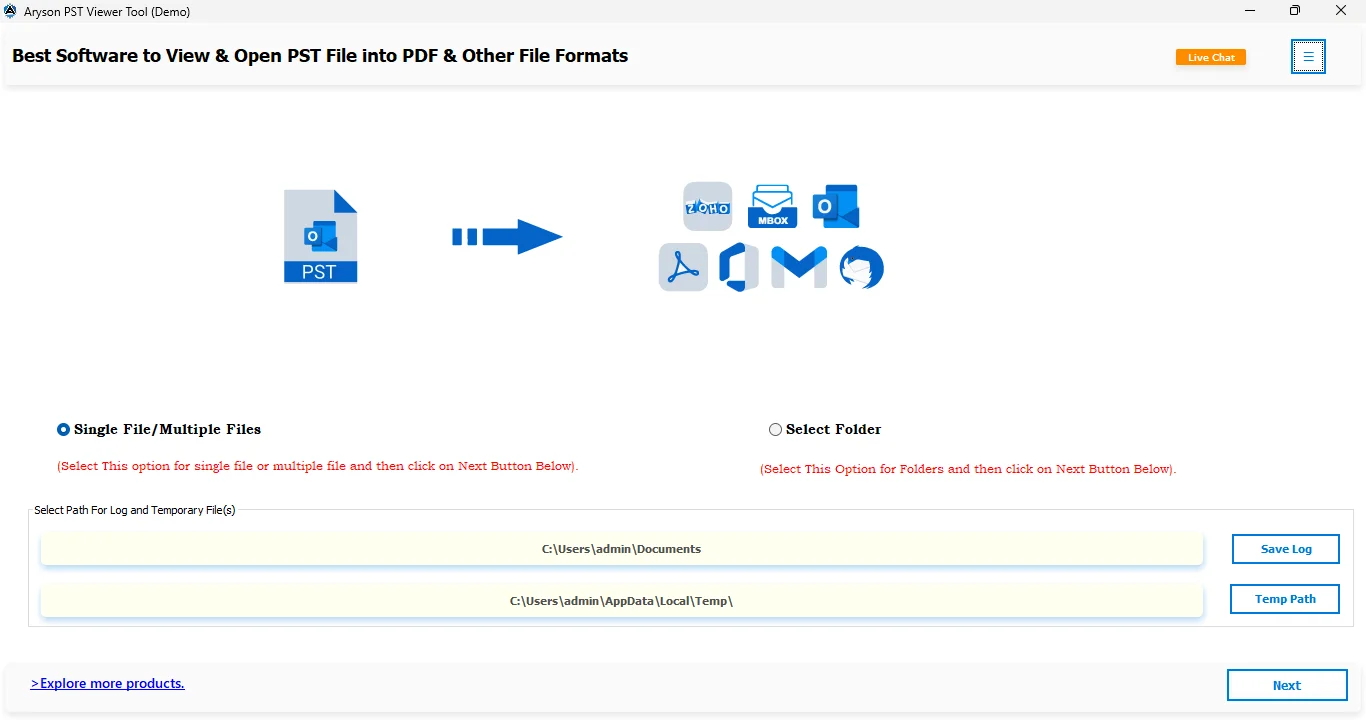
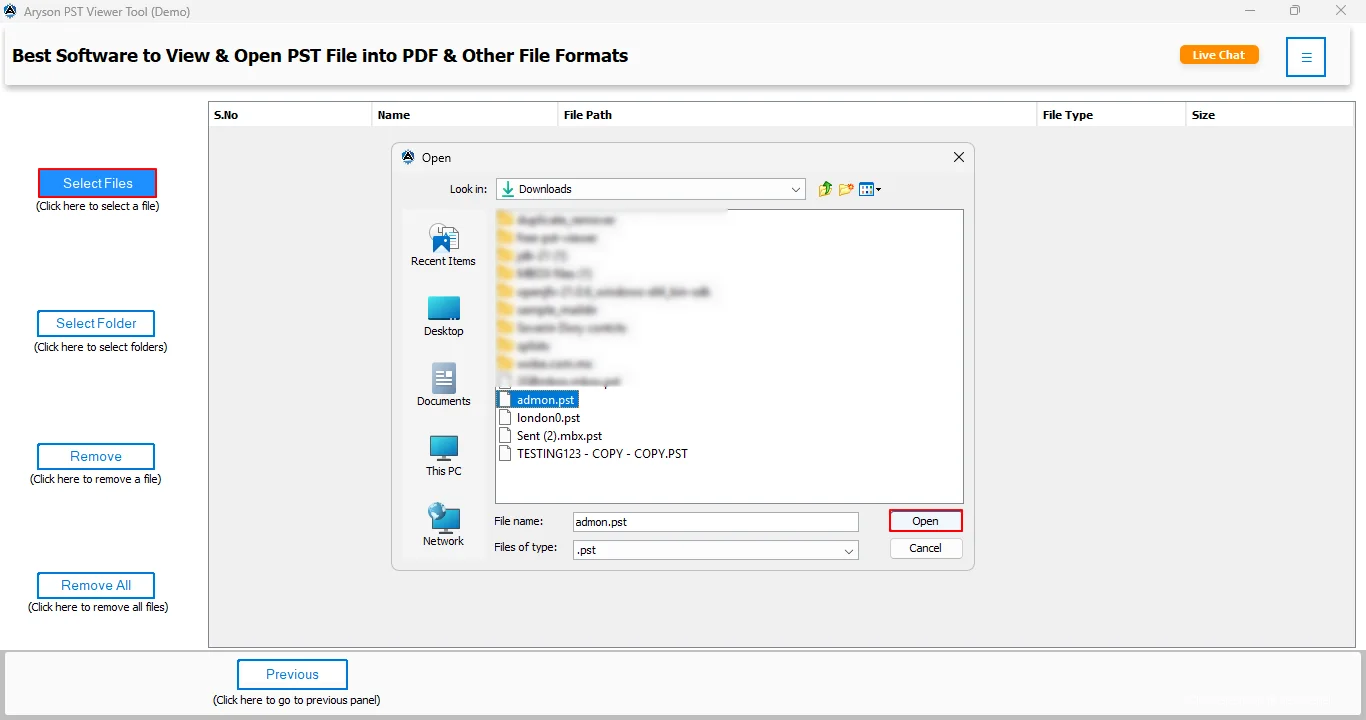
- After that, select the file/folder to load the .pst file and click on the Open button.
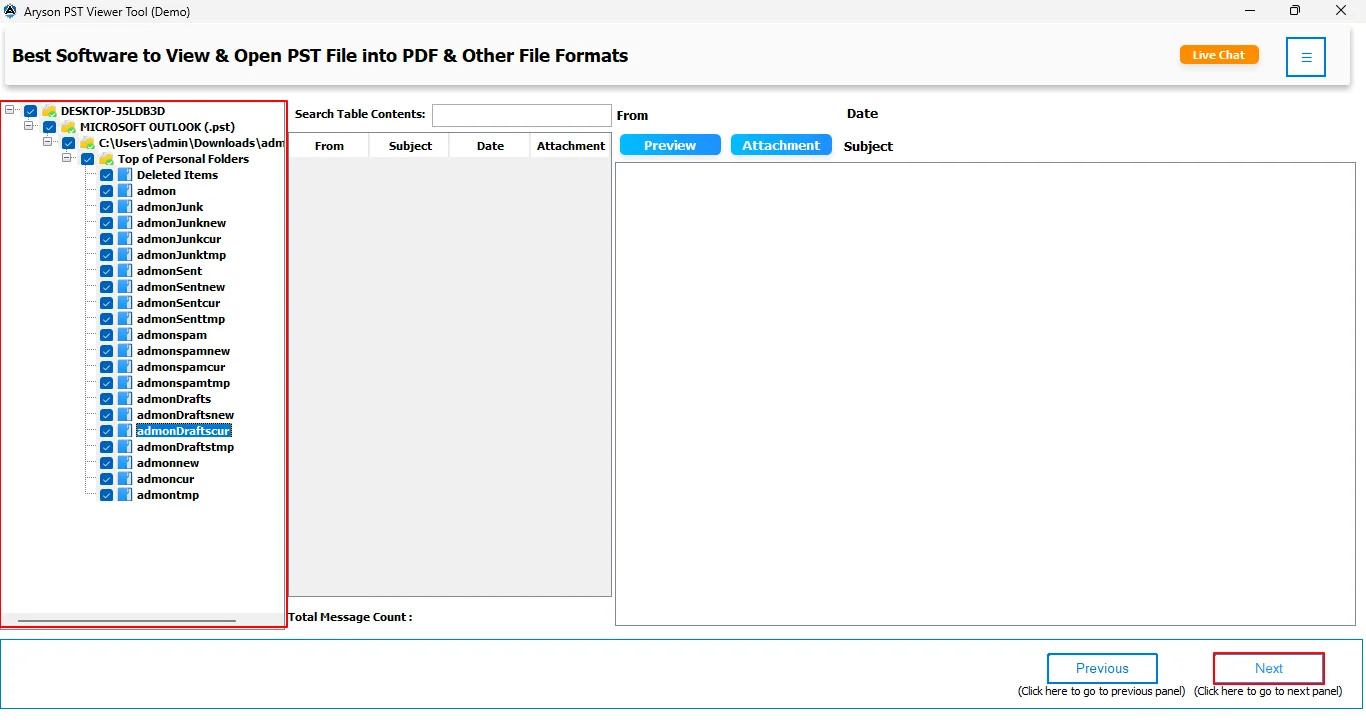
- Then, preview the loaded .pst file with its attachments and click on Next.
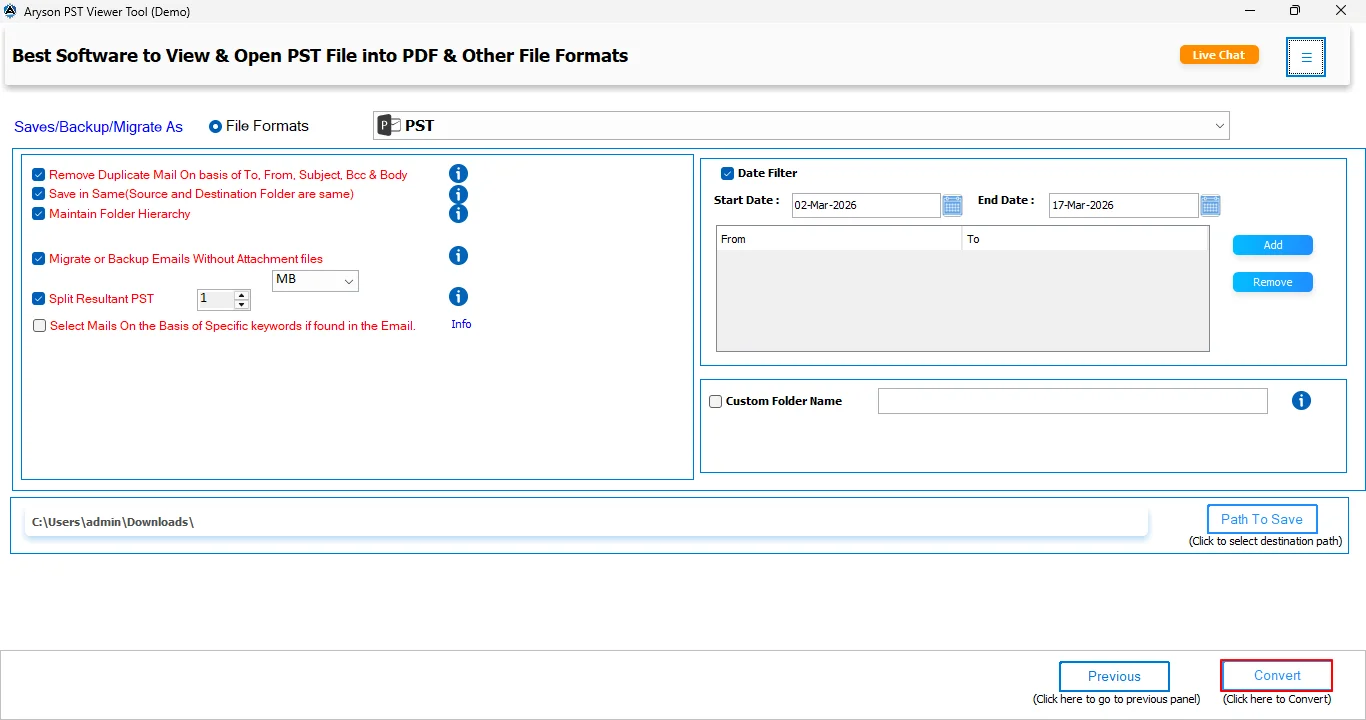
- Next, select the desired output format and apply the required filters.
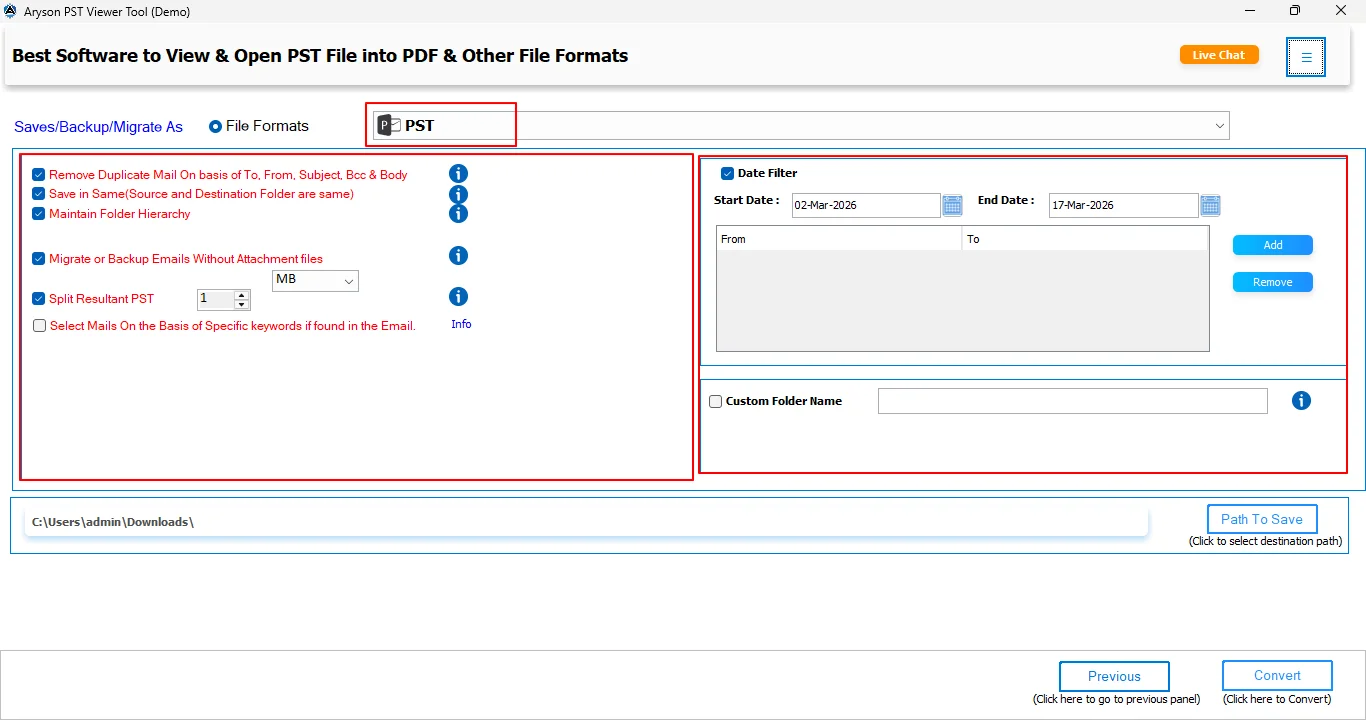
- Thereafter, provide the destination path to save the resultant file.
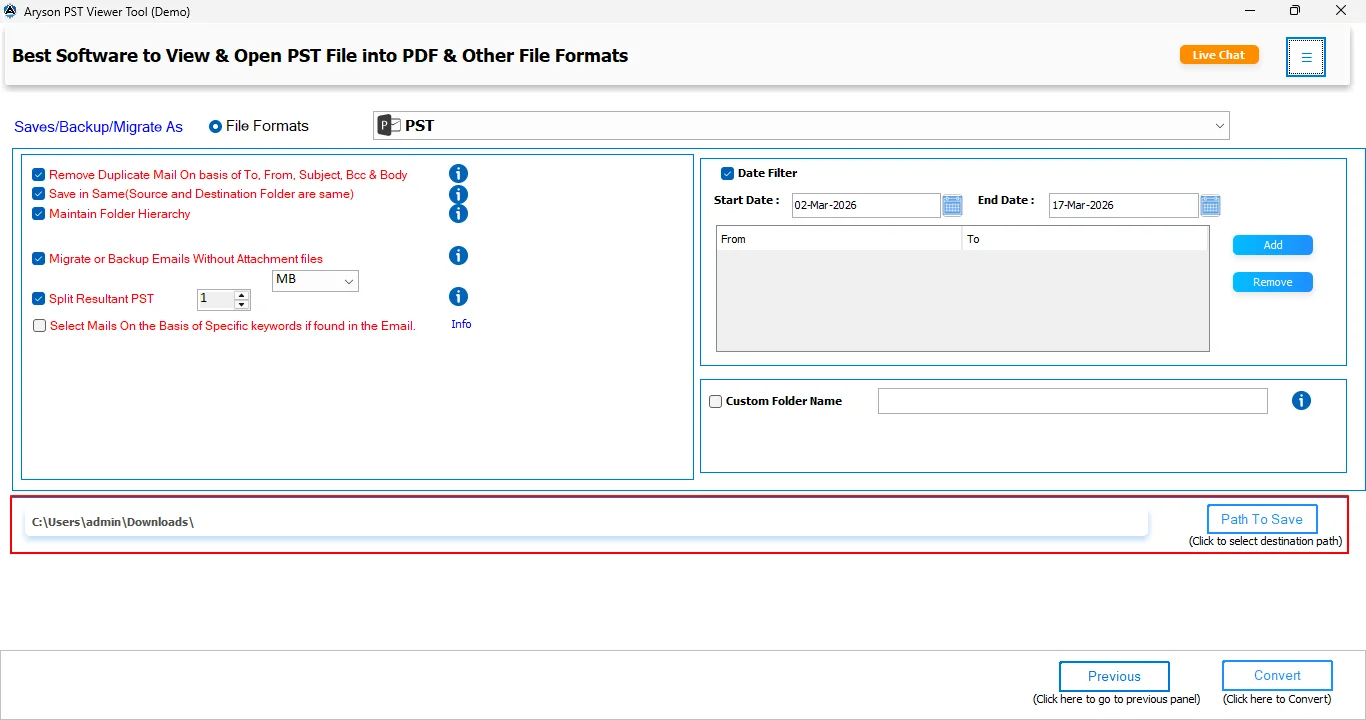
- Finally, click on the Convert button to start the process.
Benefits of this software:
- When you use this method, you can view PST file without Outlook.
- It supports opening large PST files without any inconsistencies.
- Moreover, this software has a simple interface that is suitable for all users to use.
- Along with that, it maintains the folder hierarchy and keeps the structure intact.
Common Situations Where Users Need to Open PST Files Without Outlook
A common situation occurs in small businesses where IT administrators need to access the email archives of former employees. Instead of configuring the PST file in an Outlook profile, most of the administrators prefer a PST viewer tool that allows them to quickly open, search, and review archived emails. This saves time and eliminates the need for a licensed Outlook installation.
Best Tips to Handle Large PST Files
Follow these tips to avoid any inconsistencies when open Outlook Data File without Outlook and opening a large PST file:
- Make sure to split large PST files into smaller PST files.
- It is recommended to use professional software.
- Moreover, do not open a file on a low-RAM system.
- Most importantly, always keep a backup of your valuable files.
Comparison of Methods to Open PST File
|
Method |
Easy to Use |
Support Large File |
Mac Compatibility |
|
Use Mozilla Thunderbird |
Moderate |
Limited |
Yes |
|
PST Viewer |
Easy |
Yes |
Yes |
Conclusion
If you only need to view or search PST files, a PST Viewer can provide quick access without installing Outlook. For damaged or corrupted PST files, use the professional PST viewer tool. Choose the method that best matches your requirements and file size to open PST File.
Frequently Asked Questions
Q1. How can I read emails from an old PST archive without Outlook?
Ans. You can use a PST viewer application to open and read emails stored in a PST file without installing Outlook. This tool lets you view email content, attachments, contacts, and other mailbox data directly from the archive file.
Q2. Can I open a corrupted PST file without Outlook?
Ans. Yes. If the PST file is damaged, you can use a PST repair or recovery tool to recover the mailbox data and make the file accessible again.
Q3. What’s the best way to open a 25GB PST on a new computer?
Ans. For large PST files, use a PST viewer that supports oversized archives. These applications are designed to handle large mailbox files efficiently and allow you to browse emails without importing them into Outlook.
Q4. Can I convert a PST file to an easily readable format like PDF or TXT?
Ans. Yes. The PST viewer tool can export emails from PST files to formats such as PDF, EML, and MBOX. This makes it easier to read, print, share, or archive email data without relying on Outlook.
Q5. I don’t have Microsoft Outlook, but I need to view a PST file—what should I do?
Ans. A user post there query on Microsoft Learn, and we helped them to view their PST file. Simply install the viewer, add your PST file, and browse your emails, attachments, contacts, and other mailbox items without requiring Outlook. This is a convenient option for users who only need to read or review PST data and do not want to set up Outlook on their computer.
About The Author:

Evren Cole is an expert in Email and Data Management. She has a strong passion for technology and entrepreneurship. In her free time, she enjoys football, music, and reading books.

