

-
Written By Evren Cole
-
Updated on May 23rd, 2026
How to Migrate Zoho Mail to MSG – Simple & Easy Solution
Summary: Zoho Mail is a popular email platform known for its security & advanced mailbox management features. Many users need to migrate Zoho Mail to the MSG format for Outlook compatibility and offline email access. MSG files preserve email properties, attachments, and formatting accurately. In this article, we will explain reliable methods to export Zoho Mail to the MSG, including a professional Zoho Mail backup tool for smooth migration.
Common Issues & Solutions to Export Zoho Mail to MSG
|
Problem |
Possible Reason |
Solution |
|
Login Error |
Incorrect Zoho Mail credentials |
Re-enter the correct email ID and app password |
|
IMAP Connection Failed |
IMAP access disabled in Zoho Mail |
Enable IMAP settings from the Zoho Mail account |
|
Missing Attachments |
Interrupted export process |
Restart the conversion process properly |
|
Duplicate MSG Files |
Multiple export attempts |
Use the duplicate remover feature |
|
Slow Conversion Speed |
Poor internet connection |
Ensure a stable & fast internet connection |
|
Emails Not Syncing |
Server synchronization issue |
Refresh the mailbox and reconnect the account |
|
Corrupted MSG Files |
Improper export process |
Use a reliable professional conversion tool |
Things to Prepare Before You Migrate Zoho Mail to MSG
- Check your internet before starting the export.
- Keep your Zoho Mail credentials ready.
- Create an app password if 2FA is on and check storage space.
- It’s better to keep a backup of important emails first.
Best Methods to Export Emails From Zoho Mail to MSG
There are several methods available to export Zoho Mail to the MSG format, though most users choose two trusted options according to their requirements and technical skills.
- Manual Method
- Professional Solution
Method 01: Manual Method to Convert Zoho Mail to MSG
Users can manually transfer Zoho Mail to the MSG format using MS Outlook. Follow the steps below carefully.
Step 01: Enable IMAP in Zoho Mail
- Start by signing in to the Zoho Mail account.
- After that, navigate to Settings >> Mail Accounts >> IMAP Access.
- After that, enable the IMAP option.
Step 02: Configure Zoho Mail in Outlook
- Next, open MS Outlook & tap on the Add Account.
- Afterward, enter your Zoho Mail email address.
- Then, choose the IMAP configuration option.
Zoho Mail IMAP Settings
SMTP Settings
|
Step 03: Save Emails as MSG
- Now, open the synced mailbox in Outlook.
- Then, select the required email messages.
- Now, drag and drop the emails to the desktop or any folder location.
- Finally, Outlook will save the emails in MSG format.
Disadvantages: Import Zoho Mail to MSG Manually
- Manual conversion takes a lot of time for large mailboxes.
- Users cannot export emails in bulk efficiently.
- Requires Microsoft Outlook installation.
- There are chances of missing attachments or emails.
- The process may be difficult for non-technical users.
Method 02: Automated Solution to Migrate Zoho Mail to MSG
If someone needs to export Zoho Mail to MSG in bulk, the Zoho Mail Backup Tool can be used to keep email details safe during the process. It helps users export multiple Zoho Mail emails into MSG format without Outlook installation. Additionally, users can also migrate Zoho Mail emails into several other file formats and email clients. Moreover, the software allows users to export Zoho Emails to Excel CSV for better email data management and reporting purposes.
Simplified Process to Transfer Zoho Mail to MSG:
- Initially, download & install the Zoho Mail Backup Tool.
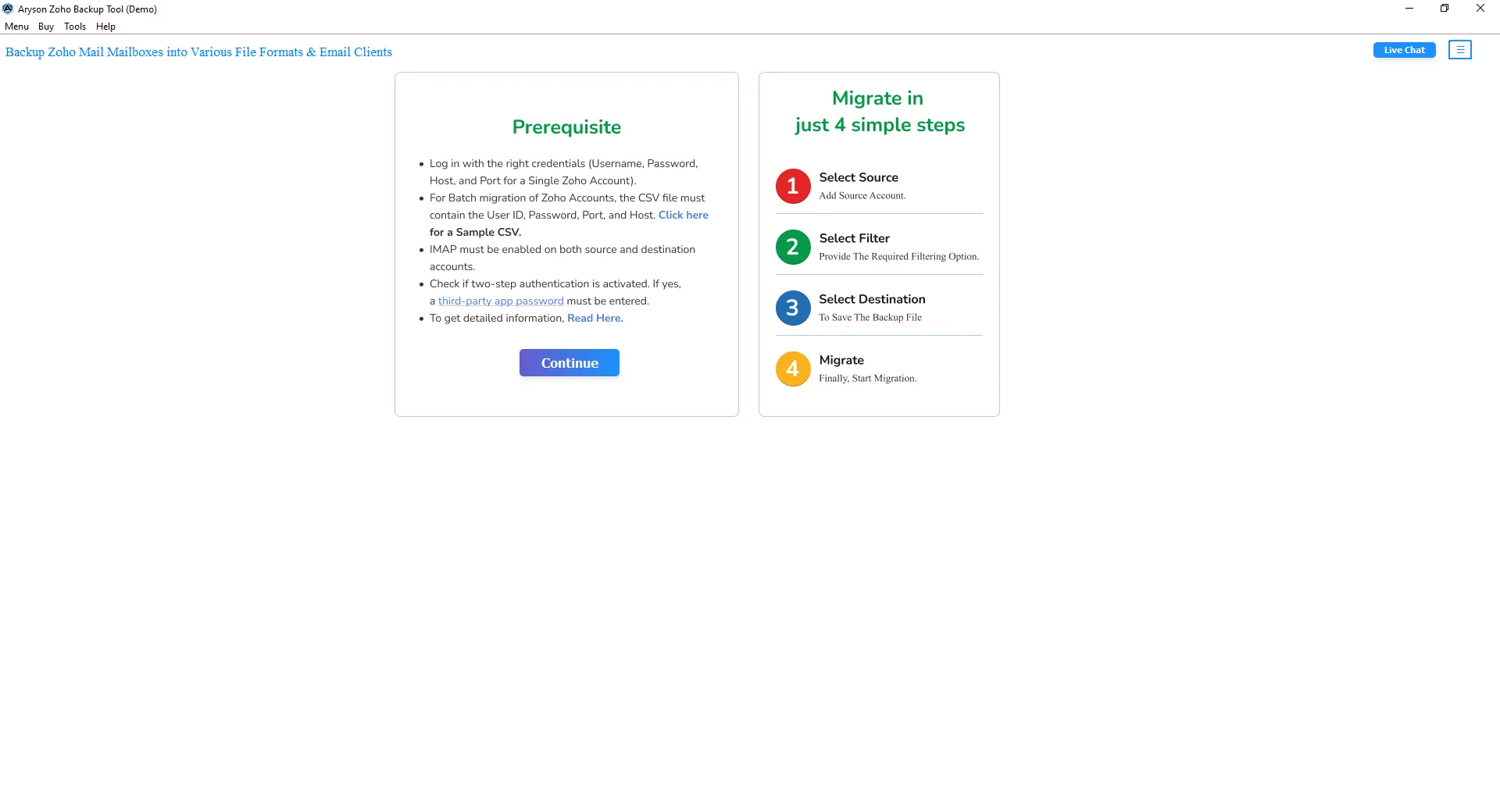
- After that, provide your Zoho Mail credentials and click on login.
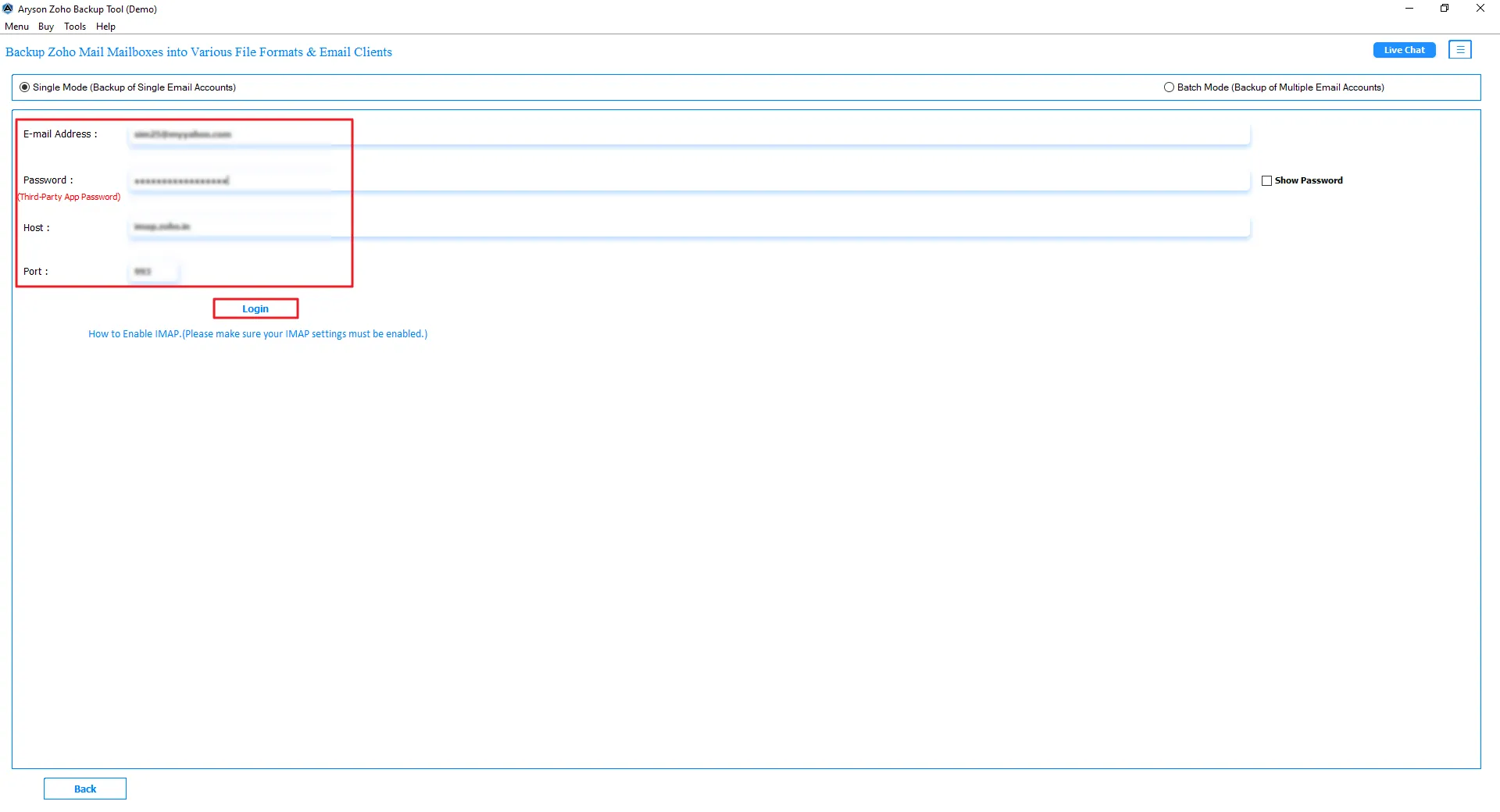
- Then, preview and select mailbox folders in the tree structure. Click Next.
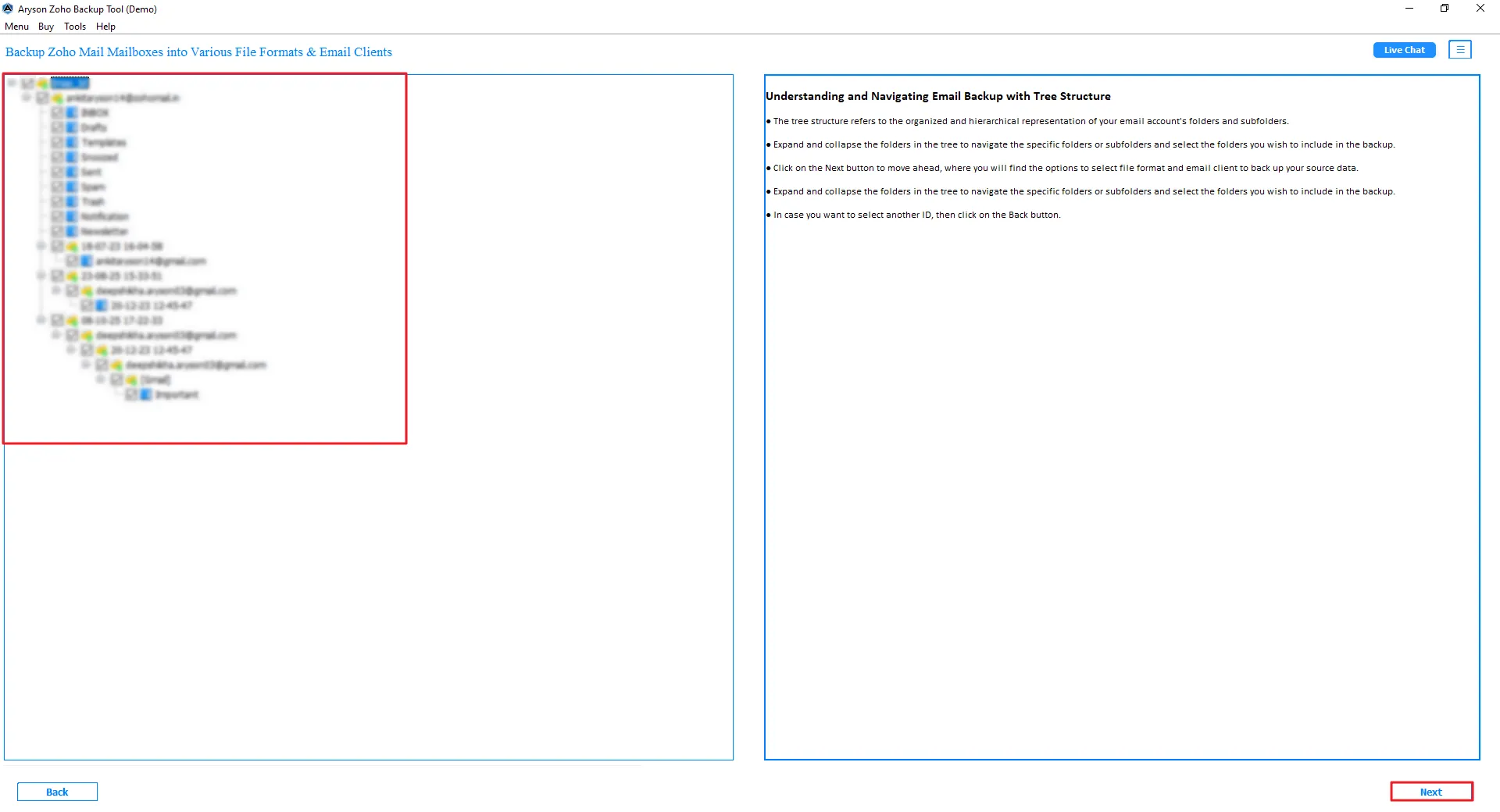
- Now, select MSG as the saving format and click Next.
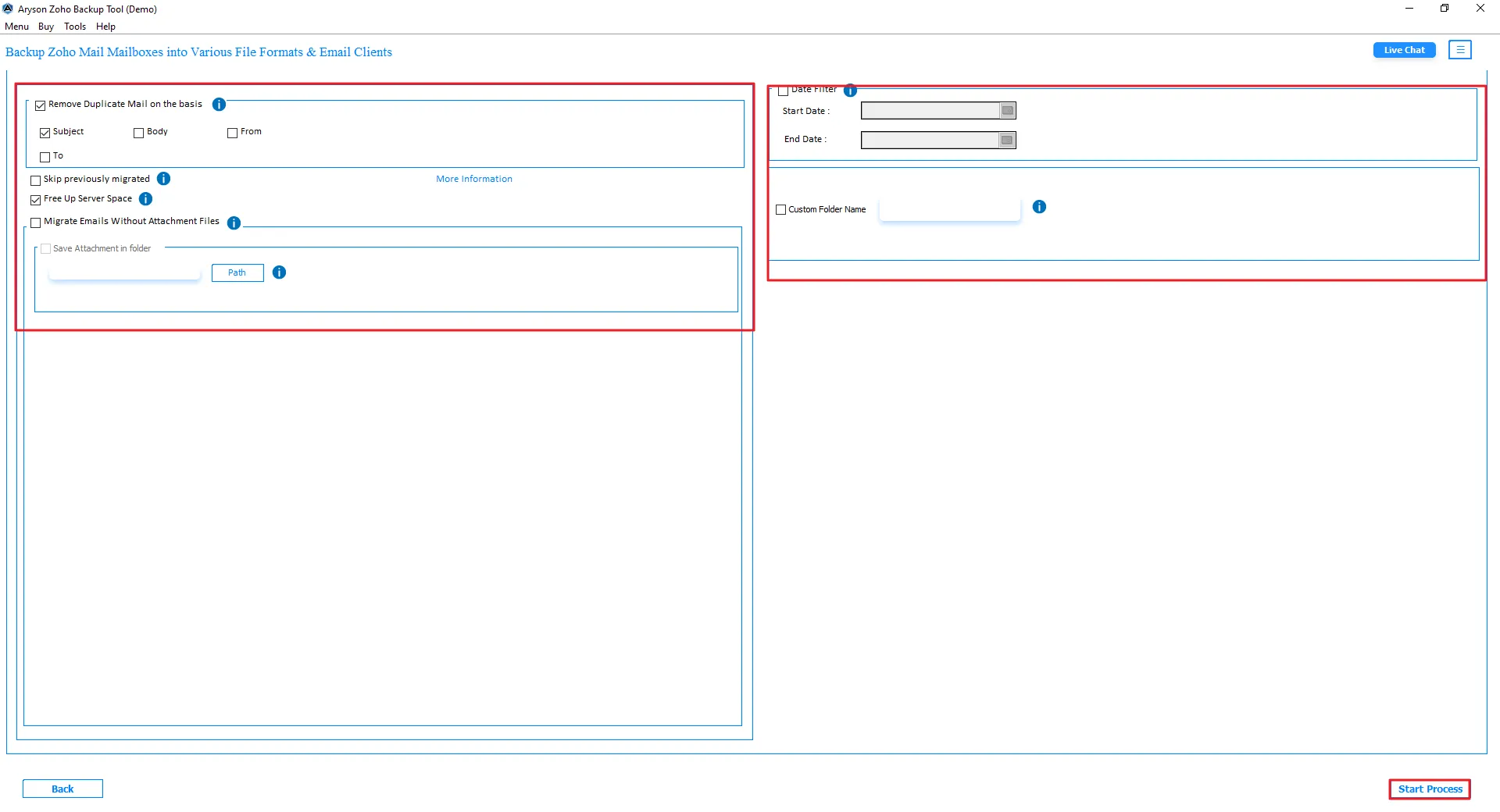
- At last, apply advanced filters or features if required and tap Start Process.
Note: Many users now prefer to migrate Zoho Mail to Google Workspace to handle emails, file sharing, and team communication from a single platform. It also makes daily work easier with Google apps and cloud access.
Conclusion
To conclude, users can choose either the manual or professional method to migrate Zoho Mail to MSG. The manual method works for limited email conversion but requires technical knowledge and significant time. Hence, using a professional Zoho Mail Backup Tool is an ideal choice for secure bulk conversion. It smoothly completes the migration while maintaining attachments, metadata, and original folder hierarchy properly.
Frequently Asked Questions:
Q.1. Is it possible to convert Zoho Mail to MSG without data loss?
Ans. A reliable Zoho Mail migration tool helps convert emails into MSG format while preserving attachments, formatting, metadata, and folder hierarchy safely during export.
Q.2. Can I transfer Zoho Mail to MSG with attachments?
Ans. Yes, you can transfer Zoho Mail emails with attachments using professional software that exports emails into MSG format without losing data or structure.
Q.3. Which tool is best to export Zoho Mail to MSG securely?
Ans. The Zoho Mail Backup Tool is considered a secure solution because it supports bulk conversion, maintains email properties, and provides advanced features for smooth MSG migration.
Q.4. How long does it take to migrate Zoho Mail to MSG files?
Ans. The overall conversion time mainly depends on mailbox size, internet speed, and system performance. Smaller mailboxes finish faster compared to large Zoho Mail accounts.
Q.5. Is it safe to export emails from Zoho Mail to MSG using third-party software?
Ans. Using trusted and verified migration software is generally safe because it protects email data and preserves attachments, formatting, and mailbox structure during the export process.
About The Author:

Evren Cole is an expert in Email and Data Management. She has a strong passion for technology and entrepreneurship. In her free time, she enjoys football, music, and reading books.

