

-
Written By Evren Cole
-
Updated on February 11th, 2026
How to Open OFT File Easily Without Outlook
Summary: An OFT File serves as an Outlook Template file that helps users draft emails with predefined text and formatting. However, without Outlook, it can be complicated to open OFT files, which can be a problem. In this technical guide, we will discuss what an OFT file is and share practical methods to open them without Outlook. We will also highlight a special, reliable tool, OFT File Converter, for the most effective results. Continue to read the blog to learn about both manual and automated solutions.
What is an OFT File?
OFT stands for Outlook File Template, which is mainly used to save ready email designs that you can reuse for the same design or format later. An OFT file can store the text, fonts, images, and even attachments of the email, so you don’t have to start the email fresh again and again. Since they are supported by Microsoft Outlook, they make sending consistent and professional emails much easier.
Since OFT is a specialized format, you can’t just double-click it and expect it to open in a normal text editor. You’ll need the right method to view OFT files without losing formatting.
Top Solutions to Open OFT Files Without Outlook
Microsoft Outlook forms are saved in OFT file formats. The core concern that comes up is how to open an OFT file for sending repeated email messages with the same layout.
Solution 1: Opening OFT Files Manually
- Firstly, open the Outlook application and click on New Email under the Home section.

- After that, fill in the details like To, Cc, Subject, and Message body.

- Then, navigate to the File menu.

- Now, in the File Menu, choose the Save As option.

- Lastly, select the location of the resultant file, and under the Save as type, pick the Outlook Template.

Solution 2: Automated Method to Open OFT File Without Outlook
If you often deal with OFT files and want a simple way to open or convert them without losing their formatting, the OFT File Converter is a reliable choice. You can open and access the OFT files even without MS Outlook with the help of the preview button. This software can easily convert the OFT files into formats like PST, EML, MSG, PDF, or MBOX.
How to Open OFT files using Automated Utility:
- Firstly, download the OFT File Converter, and click on Browse to select the OFT file.

- Select your OFT files from your local device and tap open.
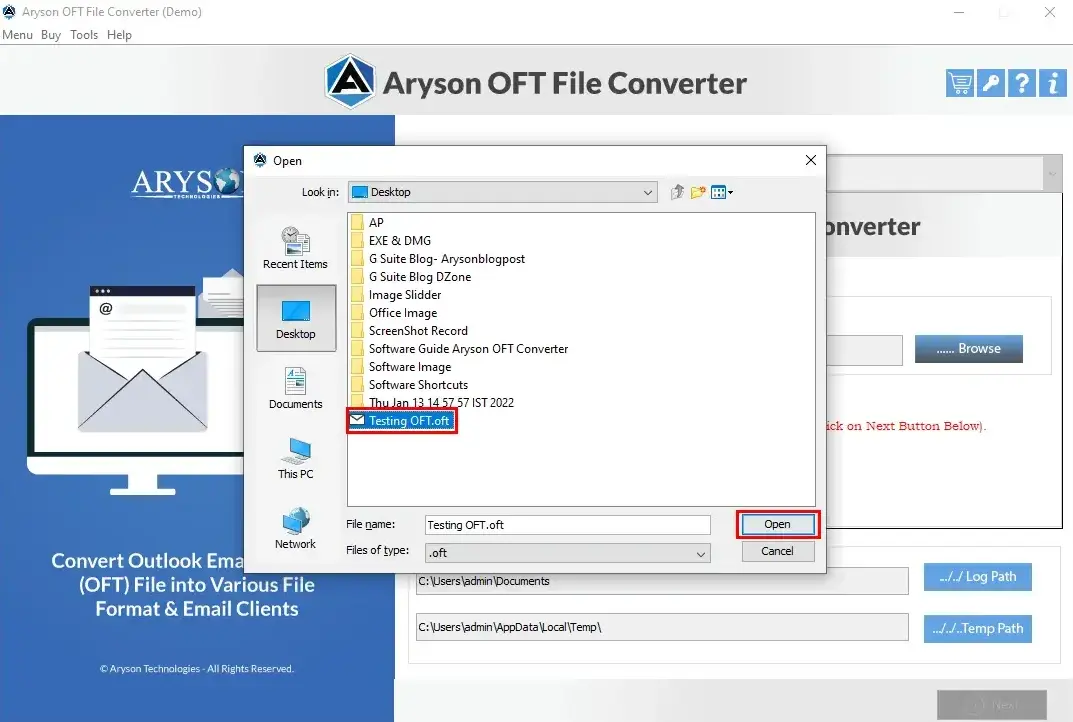
- Similarly, select the file on the left, and you can preview the content just by clicking on Preview.

- You can select any file format of your preference from the drop-down menu.

- Lastly, select and apply advanced filters and click Convert.

Best Practices to Open OFT Template File
- OFT files can contain macros, so always run an antivirus scan.
- For one-time access, an online viewer is fine. For frequent use, a professional tool is better.
- Converting with Aryson ensures the email looks exactly as intended.
Final Thoughts
When you open OFT File without Outlook, it doesn’t have to be complicated. In short, OFT files make email writing easier by letting you reuse the same design and content whenever you need. They save time, keep your emails consistent, and help you look more professional in your communication.
Frequently Asked Questions:
Q.1 How to open an OFT file?
Ans: You can open it with OFT File Converter without using Outlook by following the steps below:
1.Firstly, download the OFT File Converter.
2.Click on Browse to select the OFT file to import into the software.
3.Select your OFT files from your local device and tap open.
4.Next, preview the content just by clicking on preview.
5.You can select any file format from the drop-down menu.
6.Lastly, select and apply advanced filters and click Convert.
Q.2 Can I view OFT files on a Mac or Linux system?
Ans: Yes, using the above-mentioned software, you can view OFT files on a Mac or Linux system.
Q.3 What’s the best way to view an OFT file?
Ans: The most reliable method is using OFT File Converter, which maintains formatting and attachments.
Q.4 How to create an OFT file?
Ans: In Outlook, compose your email, then save it as an Outlook Template (*.oft) via the Save As option.
About The Author:

Evren Cole is an expert in Email and Data Management. She has a strong passion for technology and entrepreneurship. In her free time, she enjoys football, music, and reading books.

