

-
Written By Evren Cole
-
Updated on June 4th, 2025
How to Import PST File into Gmail- Verified Solutions for You!
Summary:Nowadays Gmail is at the top in the comparison with other email clients such as Outlook. It has the most advanced features and provides the utmost efficiency for better productivity. Therefore, in this article, we will explain the procedures to import PST file to Gmail with maximum data integrity. We will also introduce a professional Outlook Converter Tool that can solve all your troubles in just a few clicks.
What Is a PST File and Why Is It Important?
A PST file is a data file created by Microsoft Outlook to store your emails, contacts, calendars, and other information. If you have been using Outlook for email, all your messages are saved in this file format. However, without Outlook installed, opening or importing this file becomes a challenge. That’s why importing PST to Gmail is required.
Why You Can’t Directly Migrate PST to Gmail?
Gmail does not support PST files directly because these files are designed specifically for Outlook. This means you cannot just upload a PST file into Gmail and expect your emails to appear. However, this migration is possible by using different indirect methods. Users generally practice this when switching from Outlook to Gmail or have to share important data across different platforms.
How to Import PST to Gmail?
If you want to import PST file to Gmail without Outlook, you can use different methods, including:
- Manual Method:
- Using MS Outlook
- With the help of Google Workspace
- Professional Method:
- PST Converter Tool.
Method 01: Use Outlook to Import From PST to Gmail
If you already have Outlook installed, you can easily import your PST file by linking your Gmail account with Outlook.
Here’s how to do it step by step:
- First, open Microsoft Outlook on your computer.
- Then, click on File in the top-left corner, then select Add Account.
- A dialog box will appear. Enter your Gmail address and click Connect.
- Once you’ve signed in, click Finish to complete the Gmail setup in Outlook.
- After that, right-click on the Gmail Inbox, choose New Folder.
- Now, enter its name and click Enter to import emails from PST to Gmail.
- Further, go to the Outlook folder where your PST emails are stored.
- Select the emails you want to move and drag and drop them into the new Gmail folder you just created.
- Alternatively, you can copy and paste the selected emails into the new folder instead of dragging them.
Once you move the emails, Outlook will sync them with your Gmail account. You can then access them directly from Gmail on any device, anytime.
Method 02: Import PST to Gmail Using GWMMO
If you are a Google Workspace (formerly G Suite) user. Google offers an official and effective tool to help you import PST files into Gmail, without needing Outlook to be configured. The tool is called GWMMO (Google Workspace Migration for Microsoft Outlook).
- Firstly, install the Google Workspace Migration for Microsoft Outlook tool.
- Now, enter your email address and click Continue.
- Then, sign in and click Allow to grant the necessary access permissions.
- Further, browse and select the PST file(s) you want to import.
- Next, choose what you want to import: Emails, Contacts, Calendar, etc.
- Lastly, click Migrate and then OK to complete the migration process.
Limitations of the Manual Methods
The manual methods are free to use. But it has several limitations, such as:
- These steps can be confusing for users who have no technical experience.
- You can’t import items like notes, tasks, or journals with GWMMO.
- With manual methods, you can not perform bulk migration.
- Moreover, errors during migration could lead to missing or altered data.
- A stable internet connection is necessary. Poor connectivity may cause interruptions or failures.
Hassle-Free Way to Import PST to Gmail: A Reliable Tool
If you want to avoid these limitations, using the PST Converter Tool is the best option. It is specifically designed with an advanced algorithm to convert multiple PST files to Gmail. With this tool, you don’t need to run Outlook or the GWMO tool on your system. In addition, you can import PST to Apple Mail and other formats.
Moreover, it has user user-friendly interface, which makes the process simpler for non-tech users. This tool offers a 100% guarantee of accurate, quick, and hassle-free conversion. It can offer more advanced features like Preview, Remove Duplicate, Date filter, and more.
Try the (demo) version of this tool: A demo version of this top-notch utility is available to evaluate its features. You can save 50 emails per folder to analyze its performance. Furthermore, the demo & paid versions of this software are compatible with all Windows versions.
Quick Steps to Convert Outlook PST to Gmail:
- Primarily, install the MSOutlook PST Converter Tool.

- Next, select Files and browse the PST files. Hit Next.
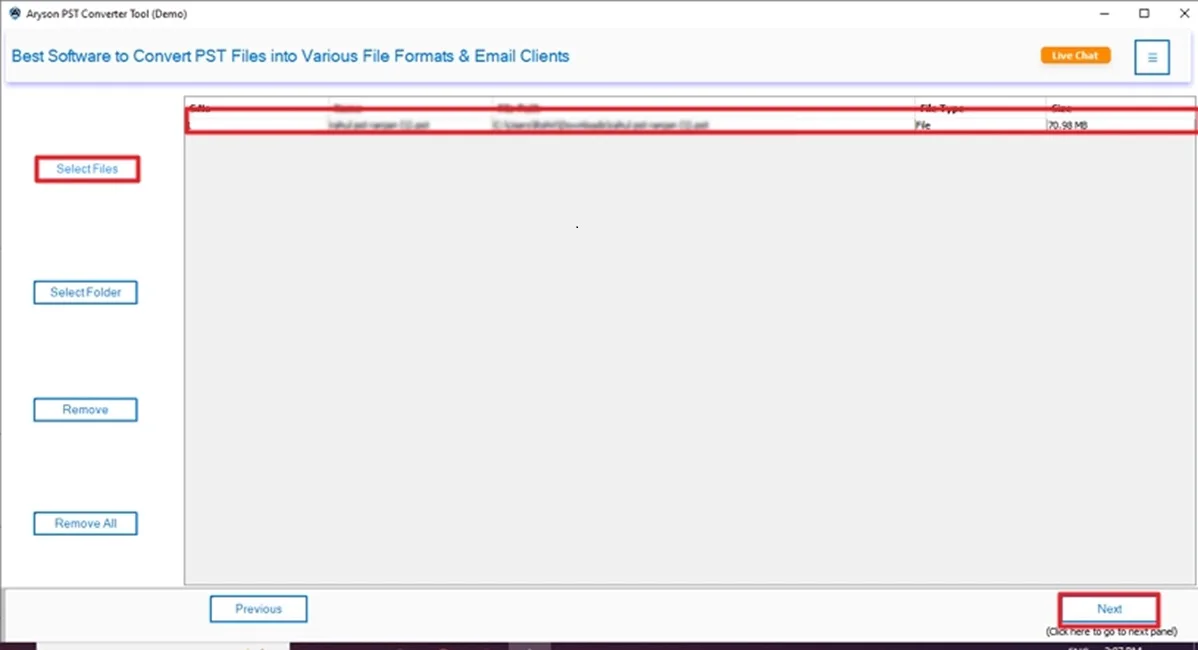
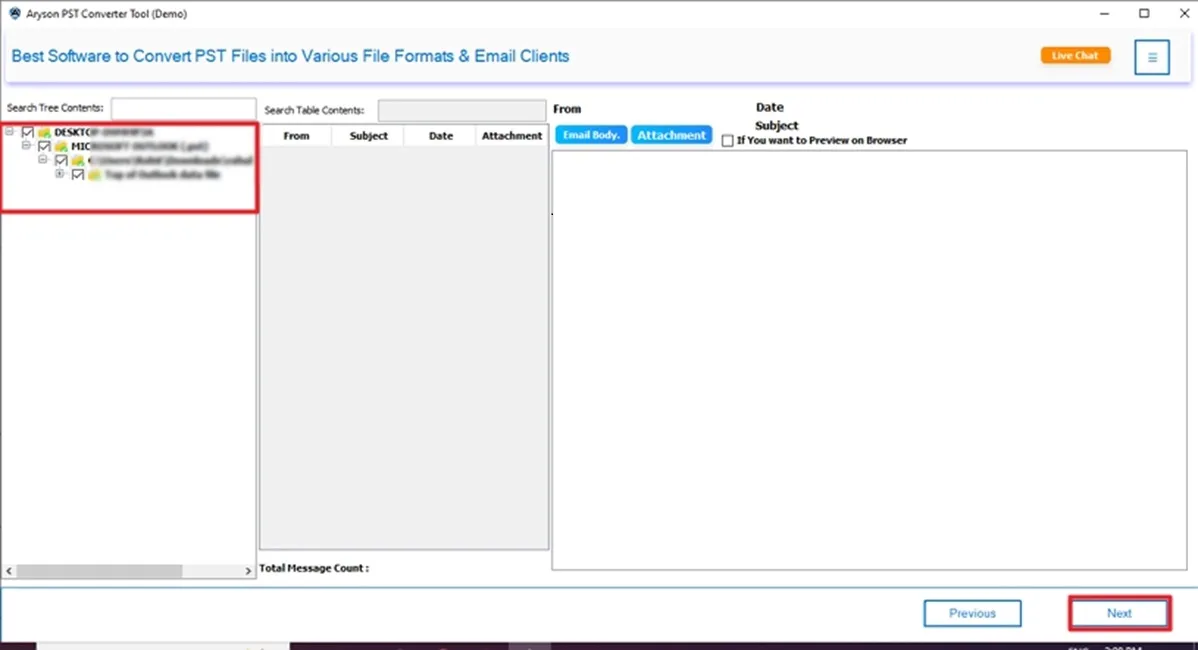
- Then, check and select (tick) the file to import. Click Next.
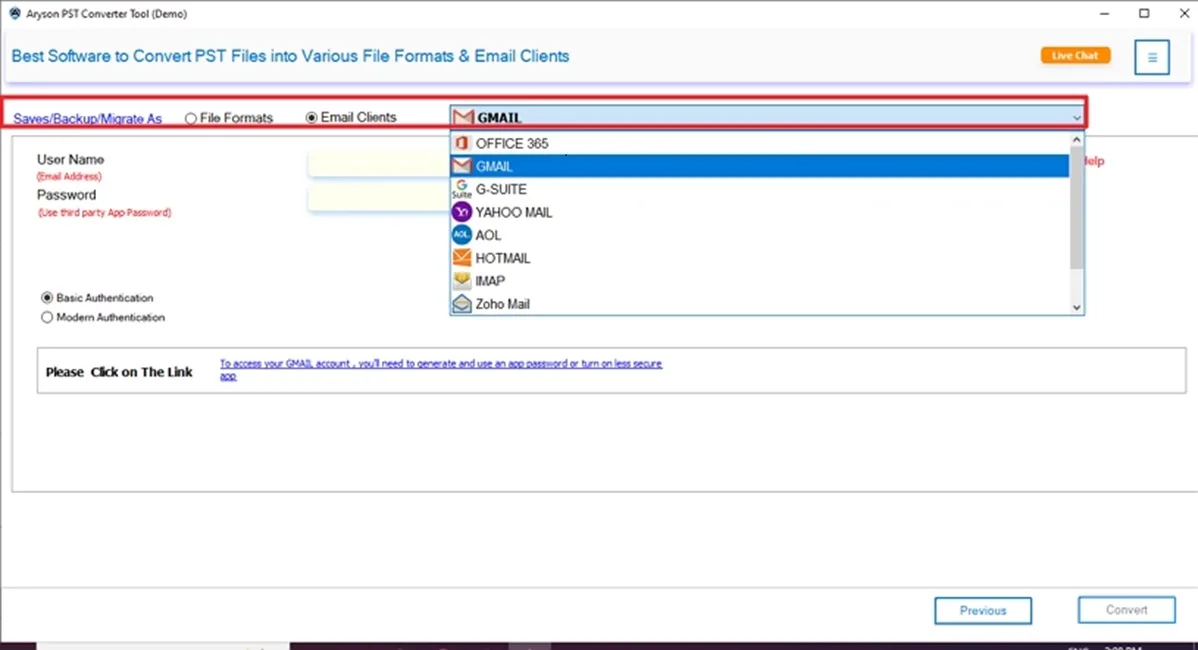
- In the Saving option, choose Gmail.
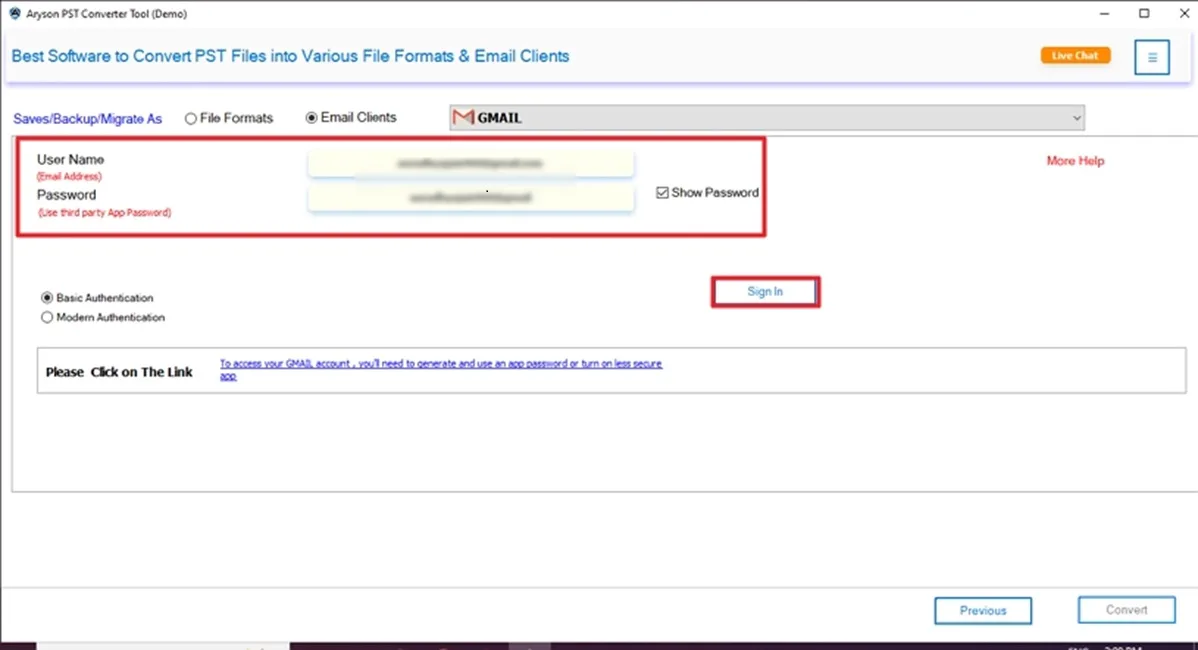
- Further, enter its credentials (Email ID & Password). Press Sign In.
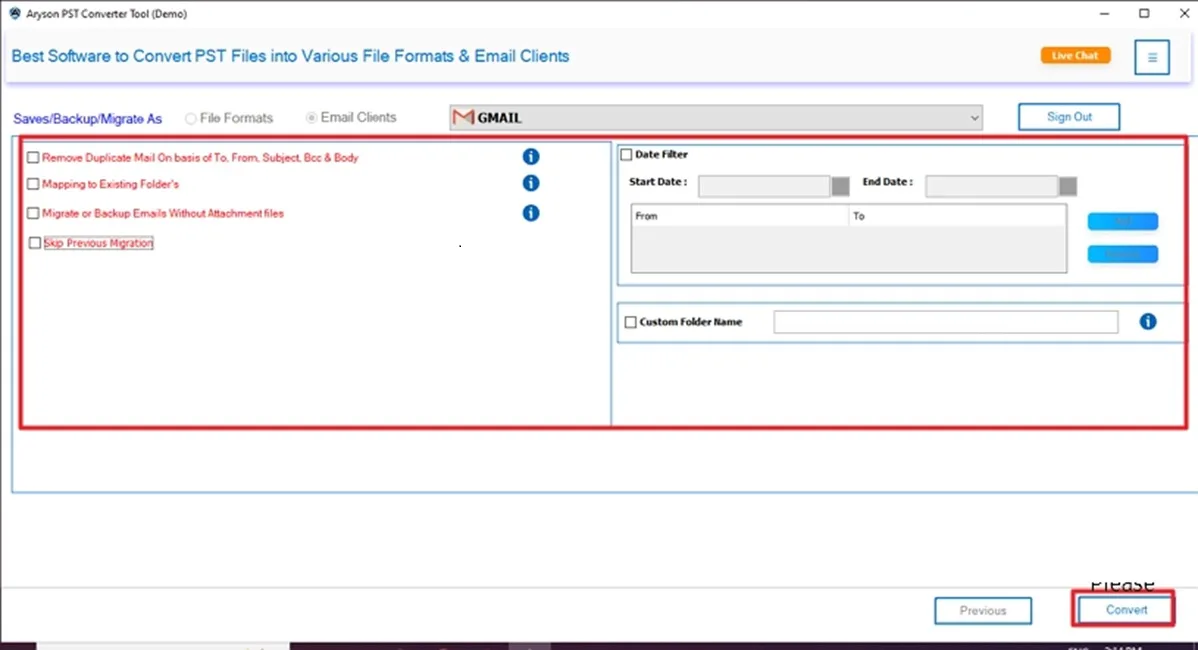
- In the end, use advanced features and click Convert.
Final Thoughts
To sum up, we have discussed several methods to import PST to Gmail. This conversion is simple with the right tool and techniques. If you choose GWMMO or a professional Converter Tool. Each method provides you with the best result, with its limitations or benefits. Furthermore, choose the best method that fulfills all your needs or requirements. Additionally, if you have any query related to this tool, 24/7 technical support is available to resolve your queries immediately.
Frequently Asked Questions
Q.1 Can I import emails from Outlook to Gmail?
Ans: Yes, you can easily import emails from Outlook to Gmail with the help of the GWMMO utility. However, for novice users and for bulk migration, the professional PST File Converter is recommended.
Q.2 How to import PST file into Gmail without Outlook?
Ans: Follow these steps:
✅Firstly, install this software (PST Converter Tool) on your system.
✅Next, click Select Files or Select Folder and add the PST >> Next.
✅Then, Preview & select the file to import. Click Next.
✅In the next panel, choose Gmail as the saving option.
✅After that, enter its credentials and click Sign in.
✅Lastly, apply filters & features and click Convert.
About The Author:

Evren Cole is an expert in Email and Data Management. She has a strong passion for technology and entrepreneurship. In her free time, she enjoys football, music, and reading books.

