

-
Written By Evren Cole
-
Updated on July 30th, 2025
How to Migrate Yandex Mail to Office 365: Automatically
Summary: Yandex Mail is an online email service from Yandex that provides contact management and alias support features. In contrast, Office 365 is a world-renowned platform that enjoys credibility with its features of email scheduling, intelligent filtering, and stronger security. If you want to migrate Yandex Mail to Office 365, you’ve come to the correct guide for a hassle-free and safe process. In this article, you’ll get to know two efficient methods that include the professional Yandex Backup Tool to safely migrate your emails without any hurdles.
Reasons to Transfer Yandex Mail to Office 365
Multiple reasons are compelling the need for the Yandex Mail mailbox to Office 365 migration. Some of them are mentioned here:
- Office 365 works seamlessly with various Microsoft tools and services.
- It also offers you enterprise-grade security compliance.
- Offers you advanced email features that help in business continuity.
- It allows users to manage and access all their emails from a unified platform.
- Using a cloud server for backup acts as the most secure backup option.
Manual Method to Migrate Yandex Mail to Office 365
Yandex Mail does not provide an option to migrate its email into Office 365. However, there is a manual method that you can apply to accomplish your task.
- Download and install the MS Outlook application on your system.
- After that, go to the file menu and open the Info section.
- Then, click on Account Setting >> Account Settings.
- After that, under the Account Settings, click on the New button.
- Here, enter the Office 365 email credentials to authenticate yourself.
- Wait for a moment to sync and configure all the data from Yandex Mail.
- Then, choose all the desired mail from Yandex Mail.
- Drag and drop all of them into the desired folder of Office 365.
- In the end, make sure all the mailboxes are accessible and safe.
Professional Tool to Migrate Yandex Mail to Office 365
To overcome the limitations of manual migration, we recommend using a professional Email Backup Tool for seamless Yandex Mail transfer. This tool allows you to export Yandex Mail to PST, MBOX, MSG, HTML, and MHTML. Moreover, it also supports direct migration to Gmail, Office 365, iCloud, IMAP, Hotmail, and Live Exchange accounts. Additionally, the software is built with a smart algorithm that preserves the folder structure and email integrity throughout the process. The software is 100% secure, ensuring reliable data migration without the risk of data loss or corruption.
Steps for Yandex Mail to Office 365 Migration
- Download and install the Email Backup Tool.
- After that, choose Yandex Mail from the available options.
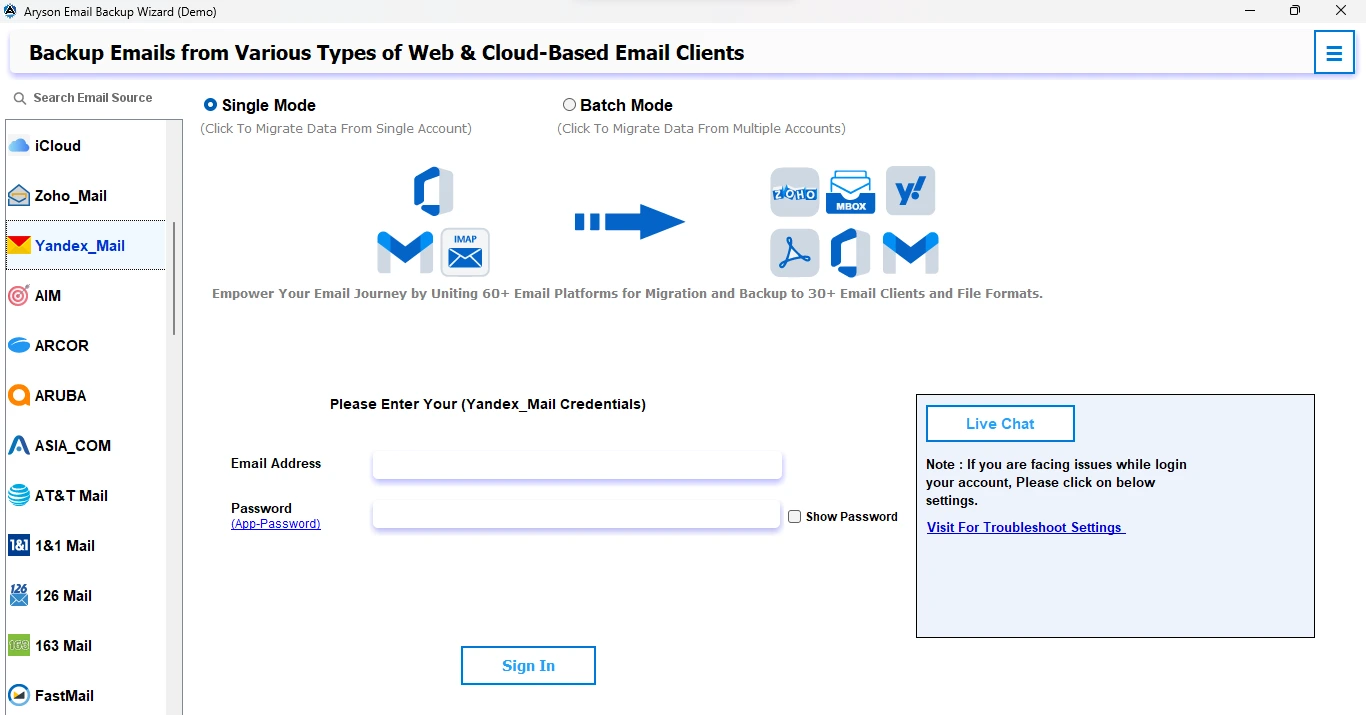
- Now, log in using the admin account credentials.
- Preview all the mail and choose the desired one.
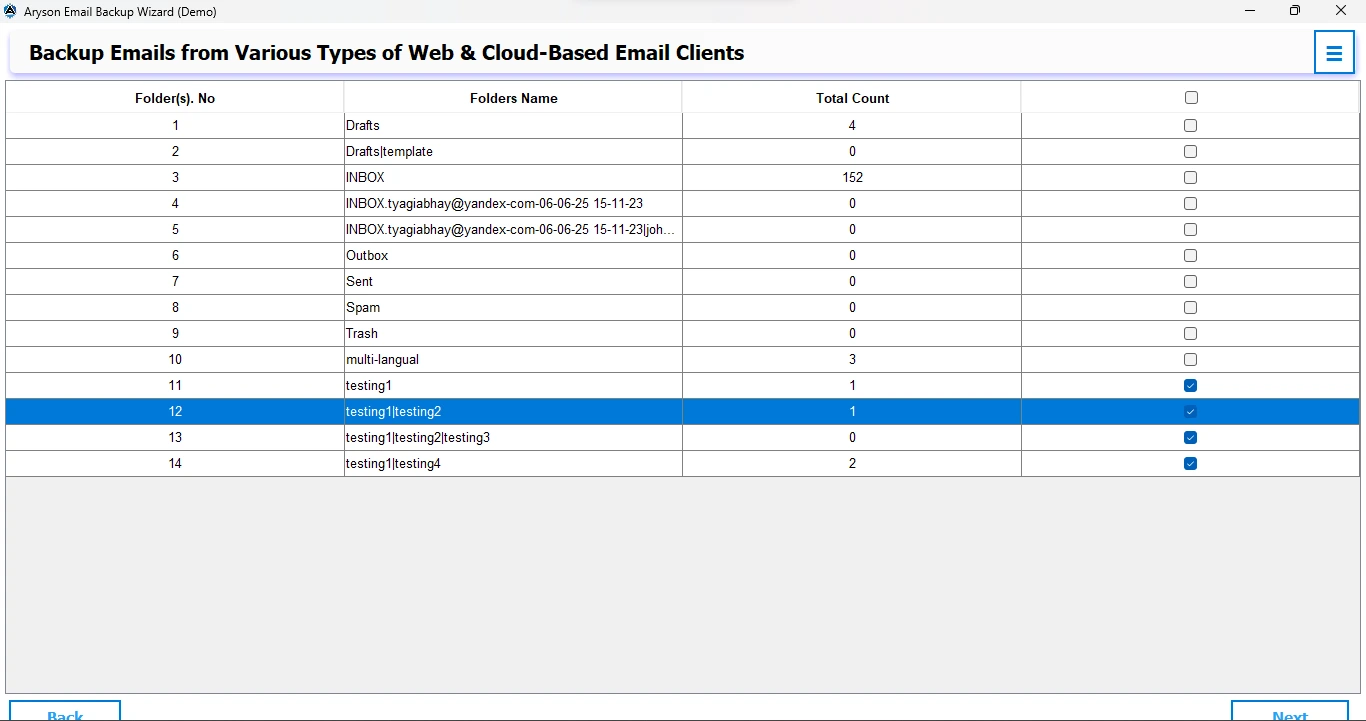
- Next, choose the Office 365 option as an output.
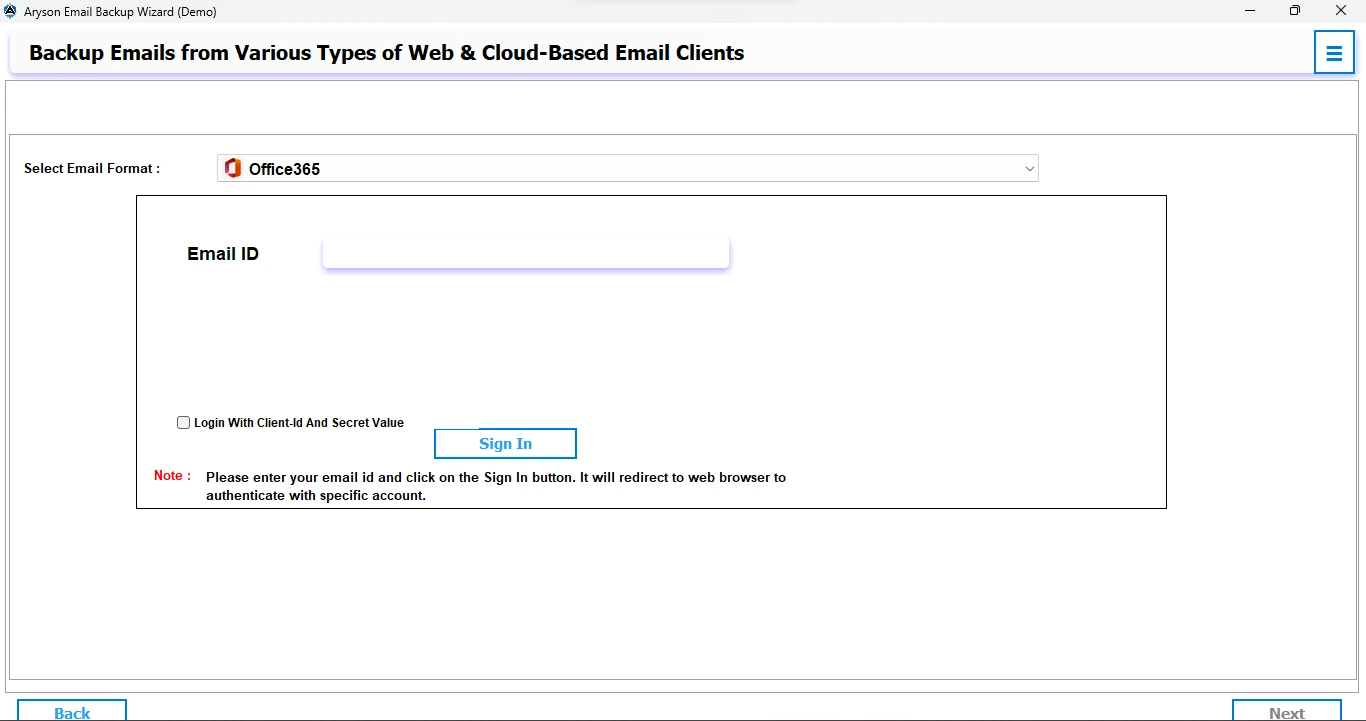
- After that, log in using the admin account credentials.
- After that, apply the desired filters as needed.
- In the end, click on the Convert button and verify your output.
Conclusion
Yandex Mail migration to Office 365 keeps your emails safe, clean, and accessible from anywhere. The manual methods are available and possible, but they are time-consuming and can lead to mistakes, particularly with large mailboxes. However, you can speed up the process with a professional tool, making it safer and more efficient for each user. It also saves your time and minimizes the loss of data during migration. Select the option that can migrate Yandex Mail to Office 365 and best meets your requirements for a hassle-free and safe transfer.
Frequently Asked Questions:
Q.1 How to migrate IMAP mail to Office 365?
Ans: To export emails from Yandex Mail to Office 365, you can utilize either the manual method or the professional method. But remember the accuracy and speed of both methods before proceeding.
Q.2 How do I add Yandex Mail to Outlook?
Ans: You can directly add your Yandex Mail to Outlook by utilizing the professional method. This tool performs your task easily and provides a hassle-free experience.
About The Author:

Evren Cole is an expert in Email and Data Management. She has a strong passion for technology and entrepreneurship. In her free time, she enjoys football, music, and reading books.

